Eigenständige Economy für Hytale-Server

Standalone economy for Hytale servers

YASCurrency Dokumentation

YASCurrency Documentation

YASCurrency stellt digitale Konten, physisches Bargeld, Balance-HUD, Spieler-Transfers, Spieler-Sprachen, Transaktionshistorie, Journal-Wartung, Admin-Werkzeuge, QuestLines-/Claims-Anbindung, Transaktionsüberwachung, Gebühren-/Steuerlogik, SQLite- und optionale MariaDB-Speicherung, strukturierte Transaktionskontexte und eine integerbasierte Java-API v4 für andere Mods bereit.

YASCurrency provides digital accounts, physical cash, a balance HUD, player transfers, player languages, transaction history, journal maintenance, admin tools, QuestLines/Claims integration, transaction monitoring, fee/tax logic, SQLite and optional MariaDB storage, structured transaction contexts and an integer-based Java API v4 for other mods.

Schnellstart

Quick start

Die wichtigsten Einstiegspunkte

The most important entry points

01

Konto öffnen

Open account

/yascurrency öffnet die Spieleroberfläche mit Übersicht, Transfer, Bargeldverwaltung und Münzwerten. Kurzform: /ycur.

/yascurrency opens the player UI with overview, transfer, cash management and coin values. Short alias: /ycur.

02

Währung verwalten

Manage currency

/yascurrency admin öffnet das Admin-Panel für Währung, HUD, Transfers, Gebühren, Bargeld, Wertstufen, Integrationen, Storage-Diagnose und Journal-Wartung.

/yascurrency admin opens the admin panel for currency, HUD, transfers, fees, cash, denominations, integrations, storage diagnostics and journal maintenance.

03

Mods integrieren

Integrate mods

Andere Mods nutzen die YasCurrencyAPI direkt oder optional per Reflection. API v4 arbeitet bewusst mit ganzen long-Beträgen und ergänzt TransactionContext, FeePolicy, Preview- und Result-Objekte, damit digitale Konten, physisches Bargeld, Gebühren und externe Integrationen konsistent bleiben.

Other mods use YasCurrencyAPI directly or optionally via reflection. API v4 intentionally uses whole long amounts and adds TransactionContext, FeePolicy, preview and result objects so digital balances, physical cash, fees and external integrations stay consistent.

Ingame-Oberflächen

In-game interfaces

Screenshots der wichtigsten Seiten

Screenshots of the most important pages

Die Screenshots zeigen die aktuelle v1.65-Kontooberfläche, Wallet-HUD-Einstellungen, Bargeldverwaltung und die wichtigsten Admin-Bereiche. Sie eignen sich für Endnutzer-Dokumentation, Server-Wikis und Support-Antworten.

The screenshots show the current v1.65 account interface, wallet HUD settings, cash management and the most important admin areas. They are suitable for end-user documentation, server wikis and support replies.

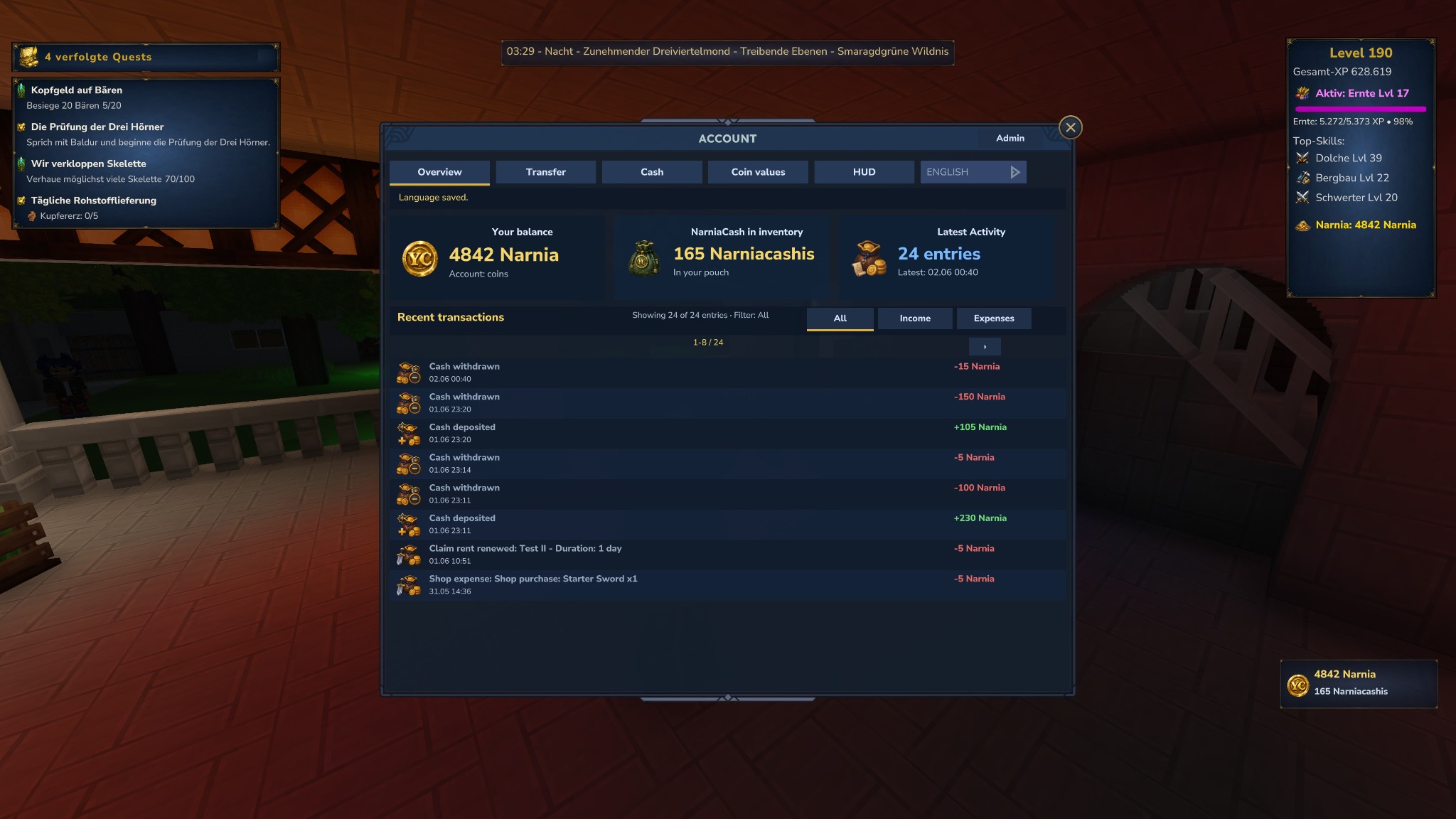
YASCurrency Kontoübersicht mit Guthaben, Bargeld, Aktivität, HUD und Transaktionsliste
Kontoübersicht: digitales Guthaben, Bargeld im Inventar, letzte Aktivität, lokale Wallet-Sprache, Transaktionsfilter, paginierter Verlauf und aktives Balance-HUD.
Account overview: digital balance, cash in inventory, latest activity, local wallet language, transaction filters, paged history and active Balance HUD.
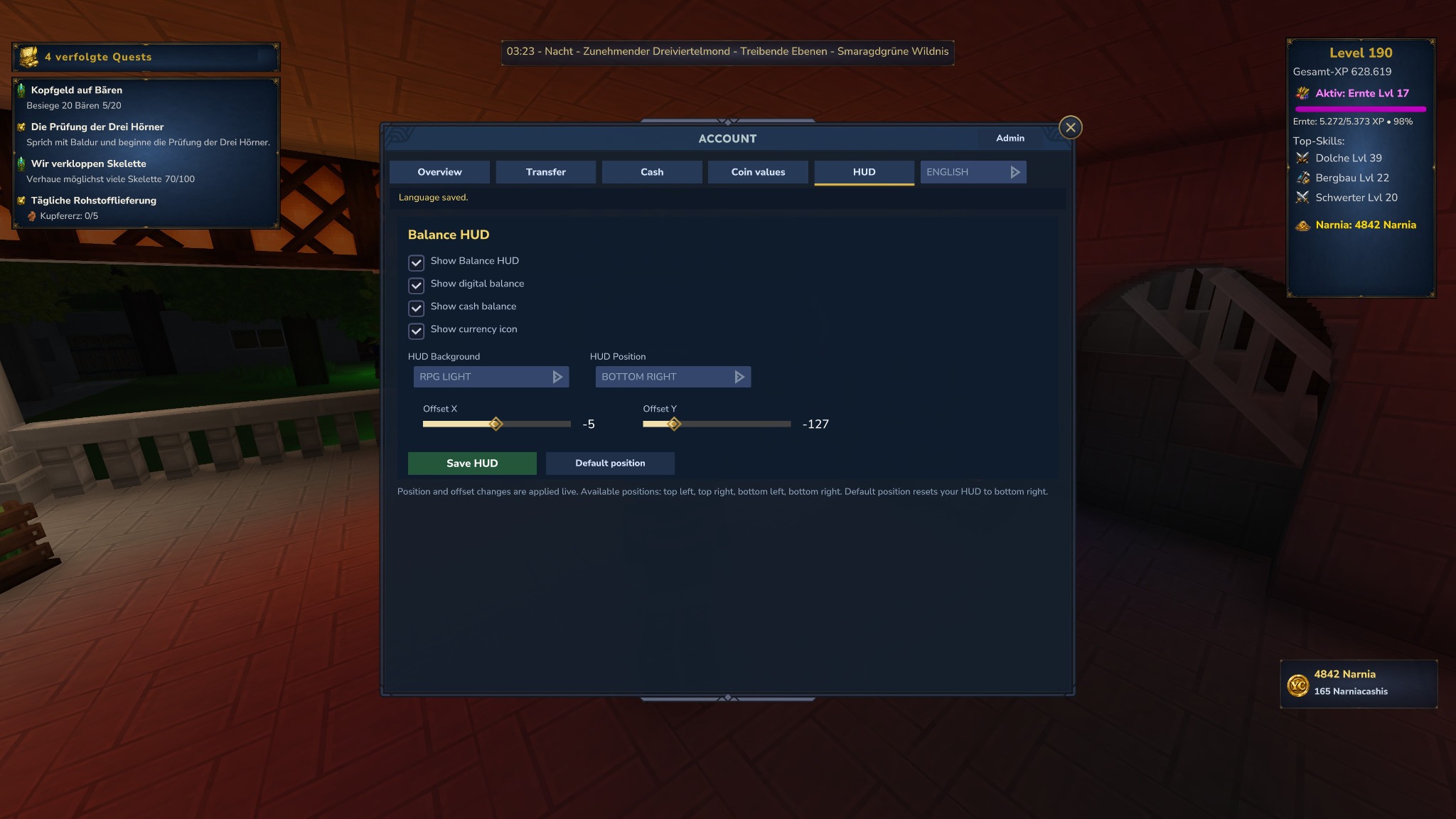
YASCurrency Wallet HUD Tab mit Balance HUD Einstellungen, Position, Offset und Hintergrundauswahl
Wallet / HUD: Spieler konfigurieren ihr Balance-HUD selbst: digitale Anzeige, Bargeldanzeige, Icon, Hintergrund, Position und Live-Offsets.
Wallet / HUD: players configure their own Balance HUD: digital display, cash display, icon, background, position and live offsets.
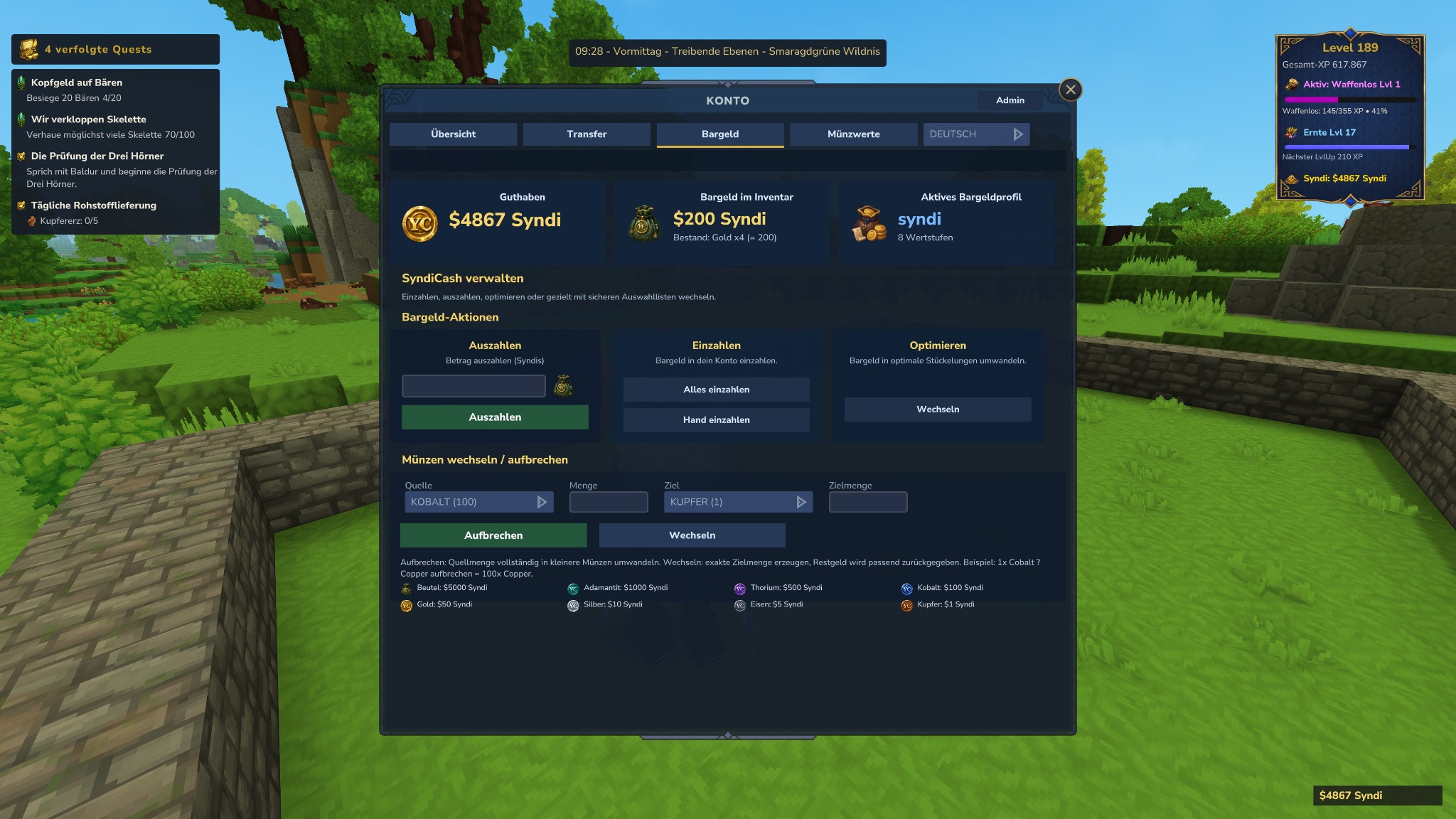
YASCurrency Bargeldseite mit Auszahlen, Einzahlen, Optimieren und Münzwechsel
Bargeld: Auszahlung vom Konto, Einzahlung aus dem Inventar, Optimieren, Aufbrechen und gezieltes Wechseln über sichere Dropdowns.
Cash: withdraw from account, deposit from inventory, optimize, split and targeted exchange using safe dropdowns.
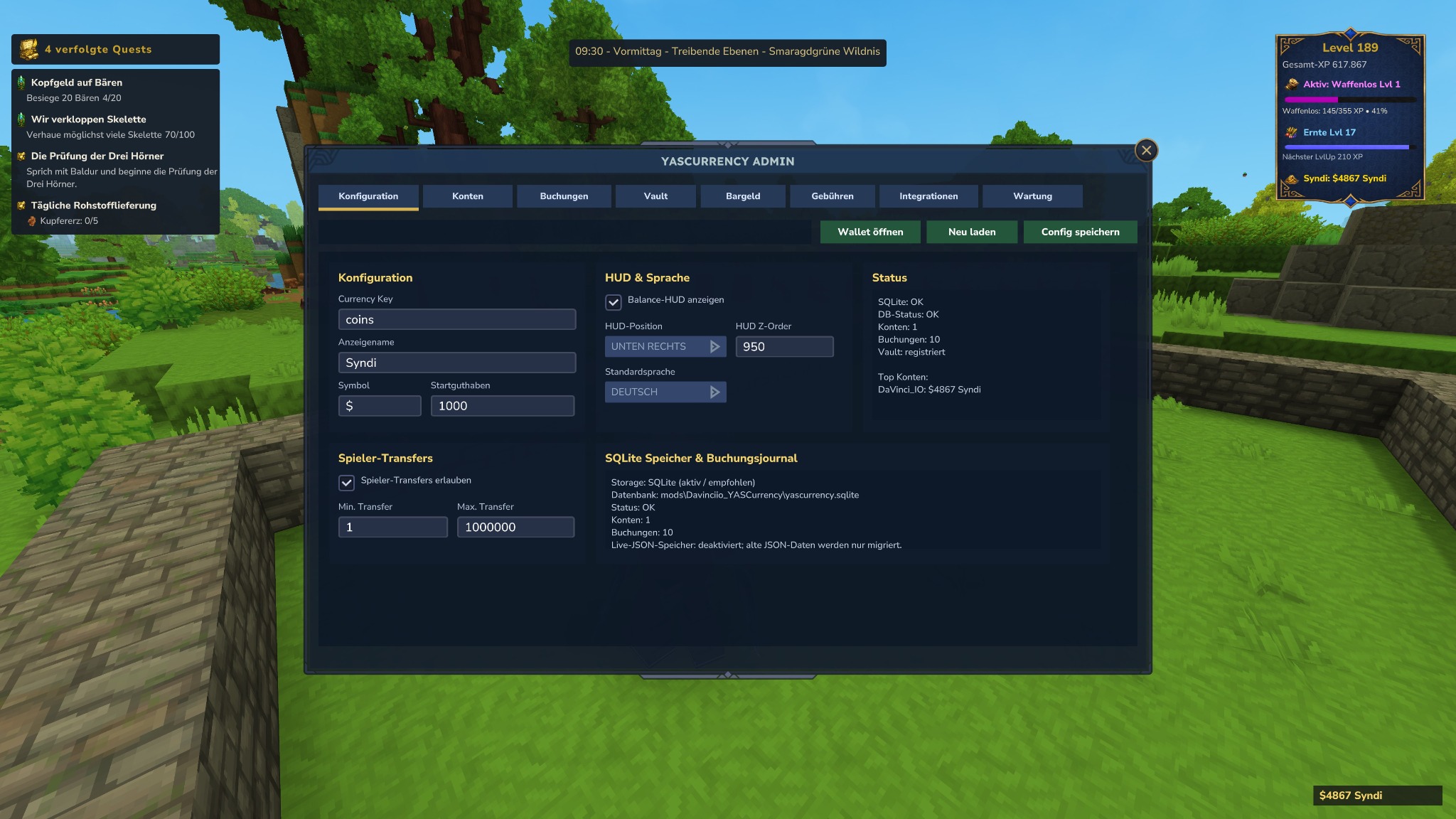
YASCurrency Admin Konfiguration mit Währung, HUD, Sprache und SQLite-Status
Admin / Konfiguration: Currency Key, Anzeigename, Symbol, Startguthaben, HUD, Standardsprache, Transfers und Speicherstatus.
Admin / Configuration: currency key, display name, symbol, starting balance, HUD, default language, transfers and storage status.
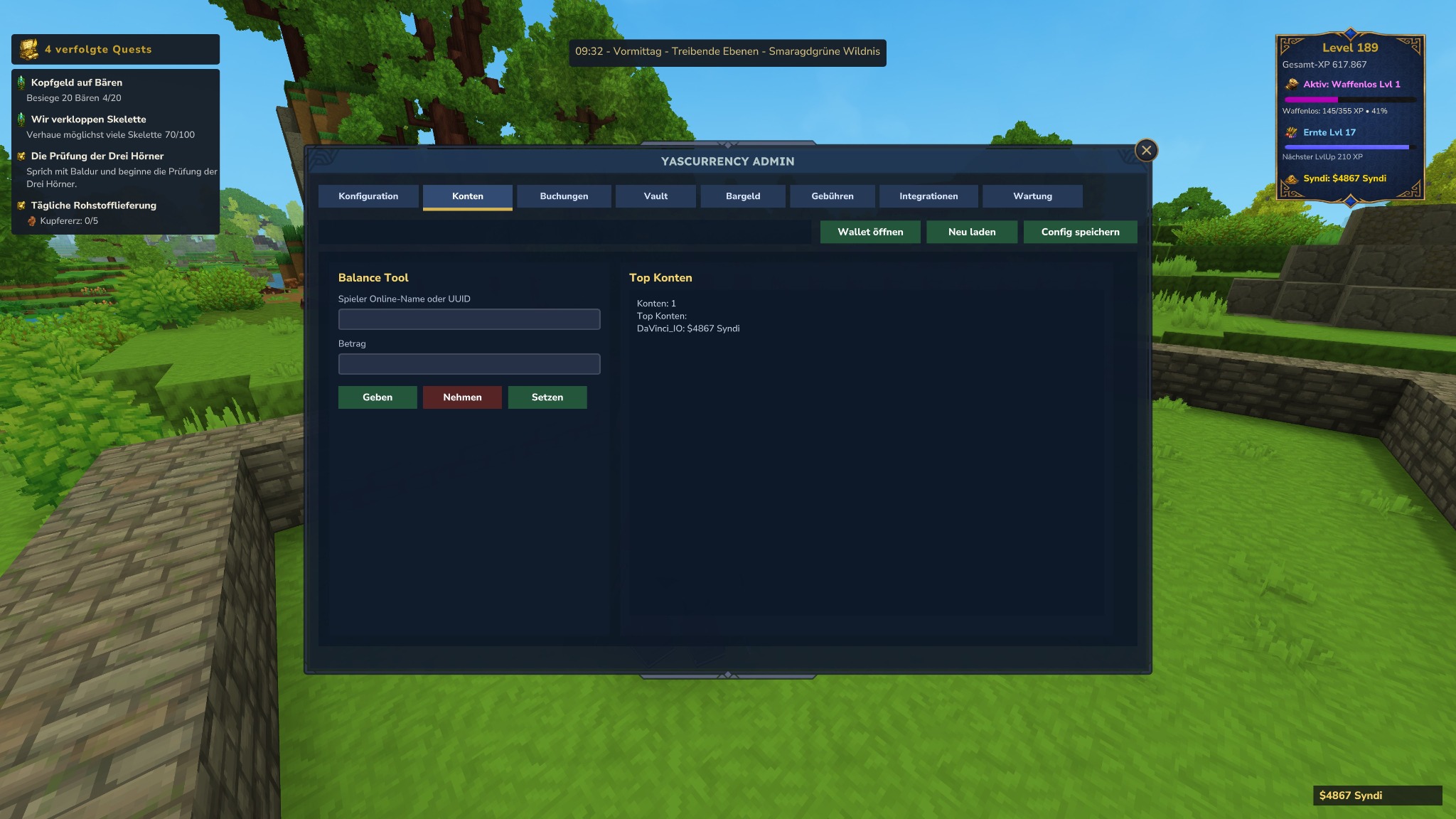
YASCurrency Admin Konten mit Balance Tool und Top Konten
Admin / Konten: Balance Tool für Geben, Nehmen und Setzen per Online-Name oder UUID.
Admin / Accounts: balance tool for giving, taking and setting by online name or UUID.
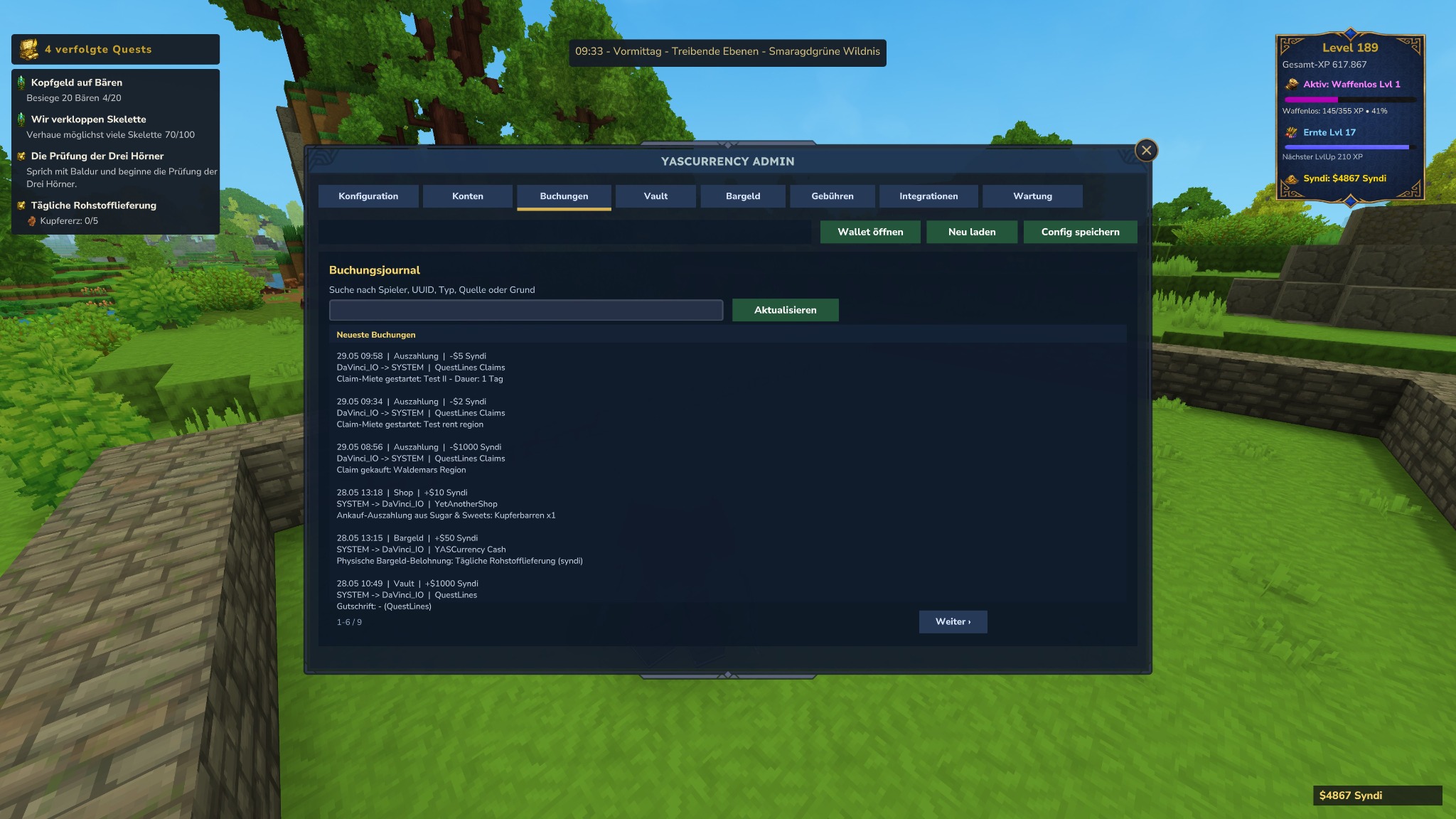
YASCurrency Admin Buchungsjournal mit Suche und Pagination
Admin / Buchungen: globales Journal mit Suche, Pagination und lesbaren Quellen wie Shops, QuestLines oder Claims.
Admin / Bookings: global journal with search, pagination and readable sources such as shops, QuestLines or Claims.
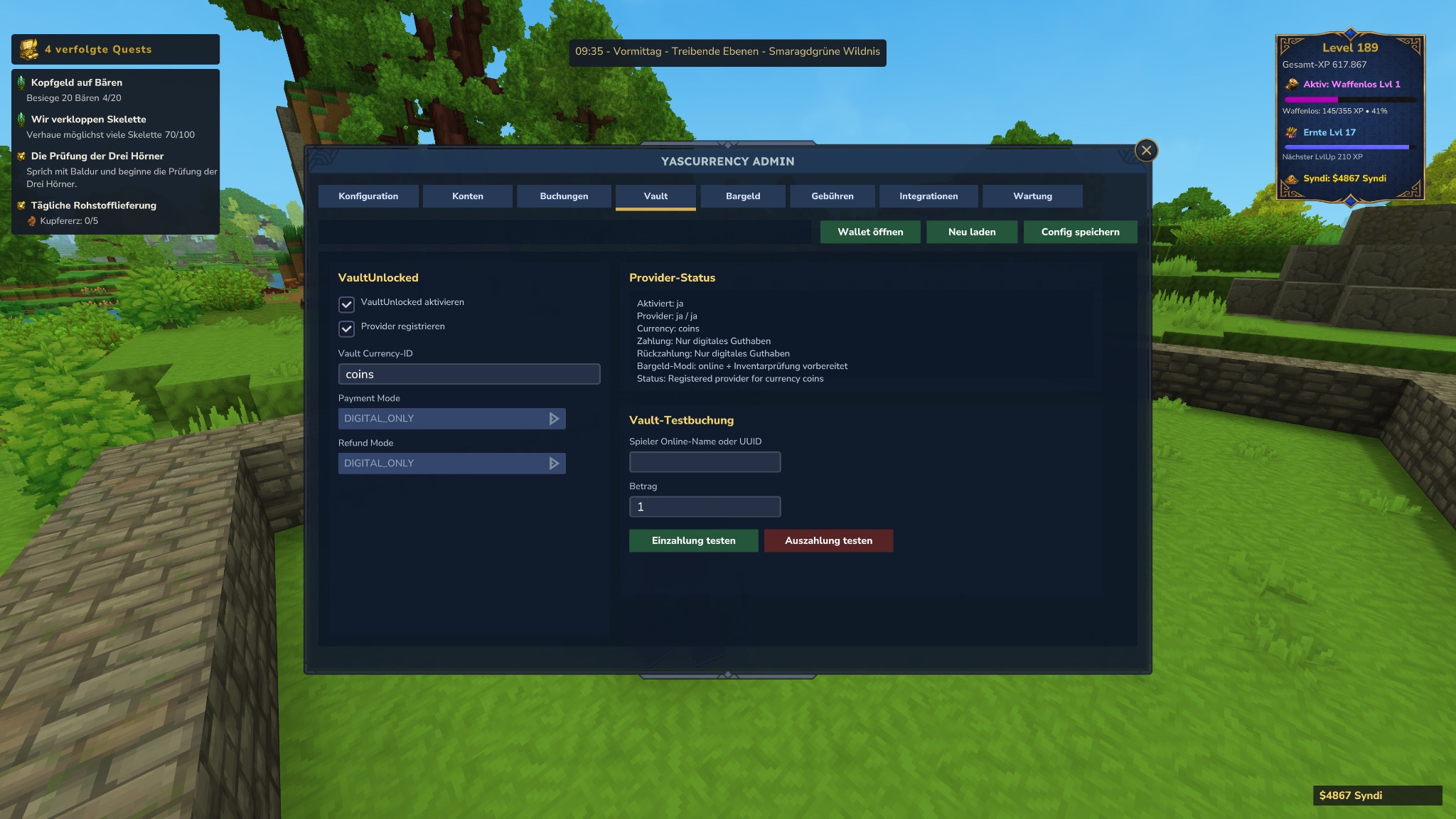
YASCurrency Admin VaultUnlocked Provider und Testbuchung
Admin / Vault: VaultUnlocked-Provider, Currency-ID, Zahlungs-/Refund-Modus und Testbuchungen.
Admin / Vault: VaultUnlocked provider, currency ID, payment/refund mode and test bookings.
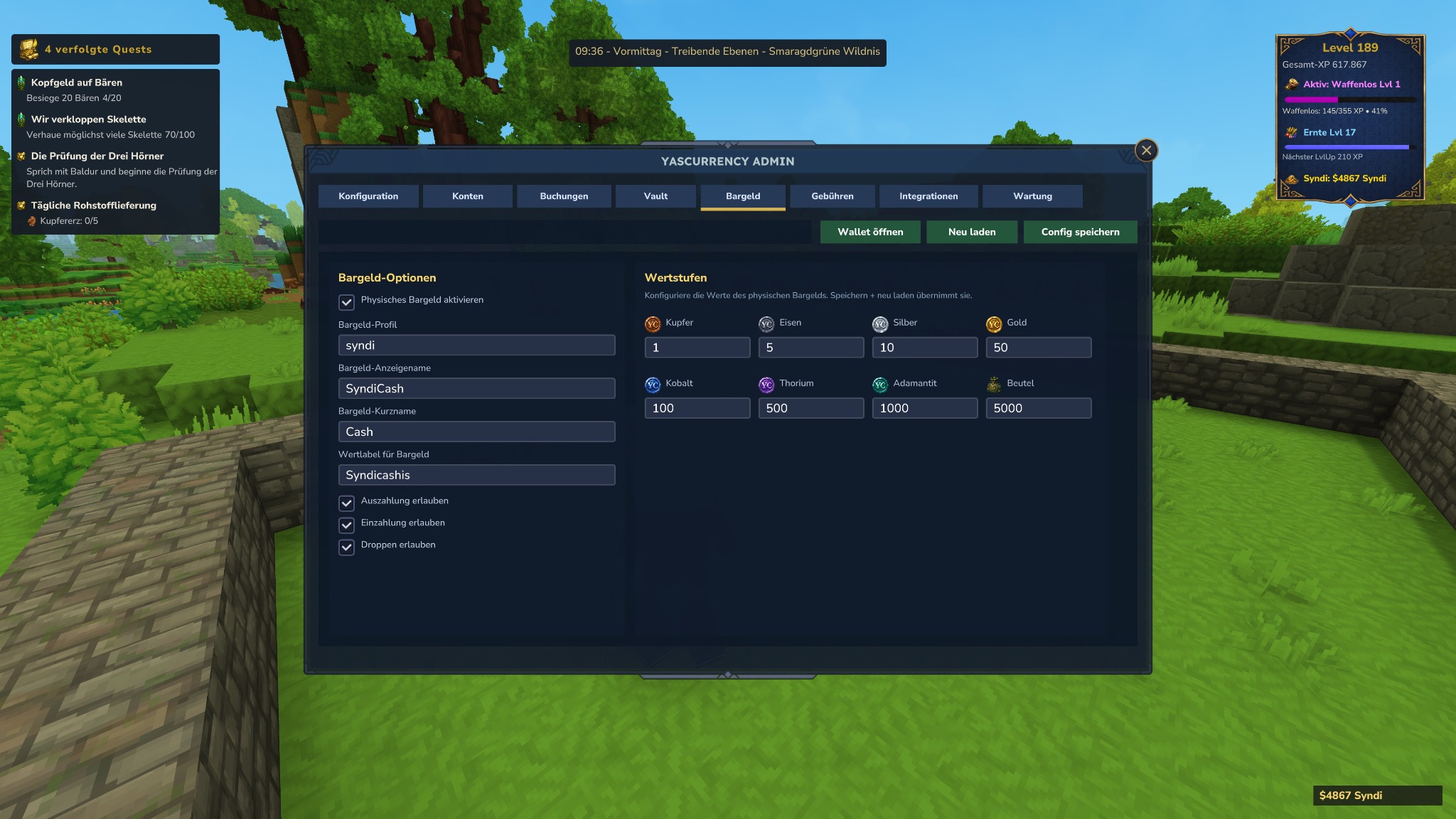
YASCurrency Admin Bargeldoptionen und Wertstufen
Admin / Bargeld: physisches Bargeld aktivieren, Profilnamen setzen und Wertstufen konfigurieren.
Admin / Cash: enable physical cash, set profile names and configure denominations.
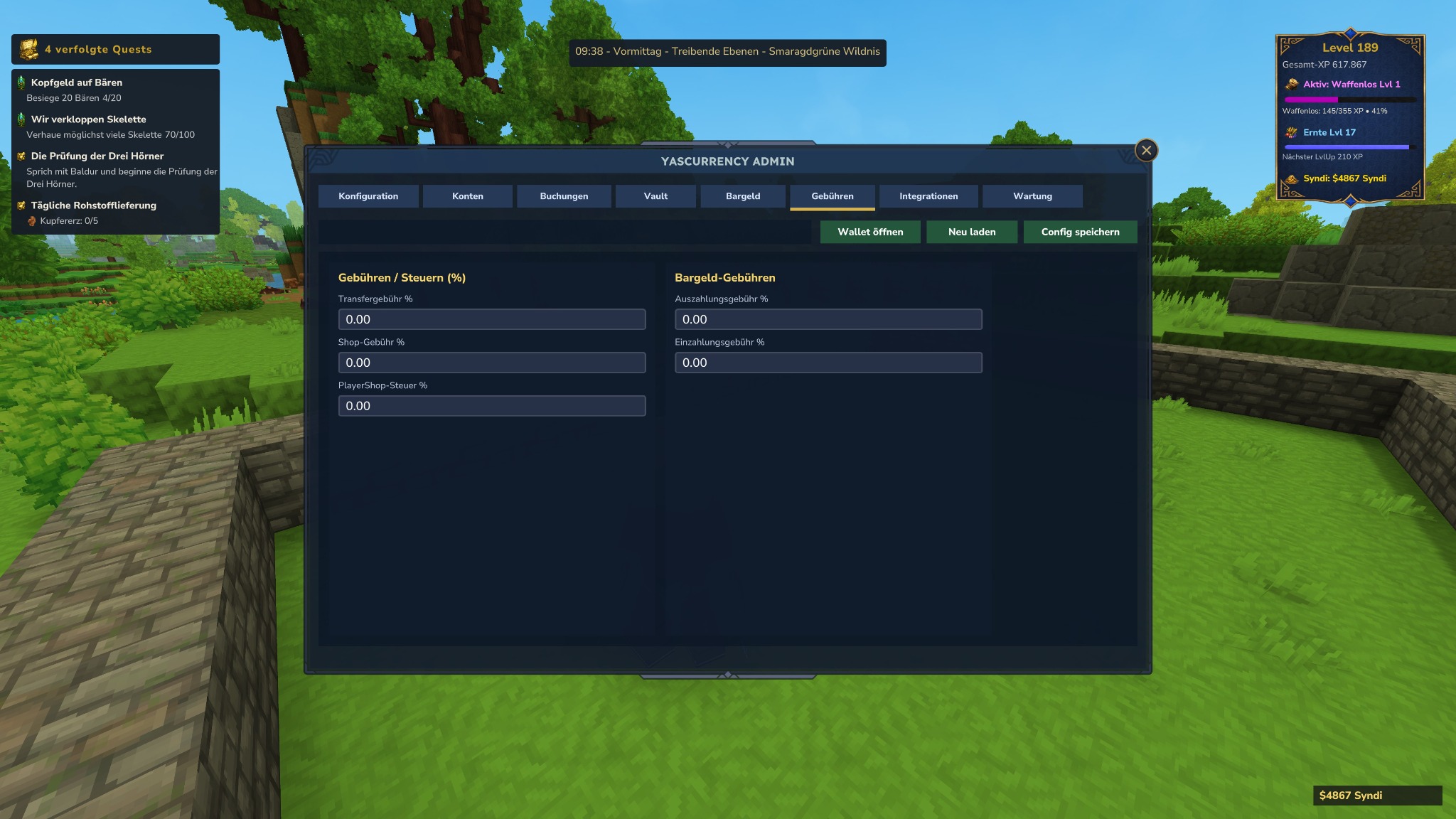
YASCurrency Admin Gebühren und Steuern
Admin / Gebühren: Transfer-, Shop-, PlayerShop-, Einzahlungs-, Auszahlungs-, Quest-Belohnungs- und Claim-Gebühren als Prozentwerte.
Admin / Fees: transfer, shop, PlayerShop, deposit, withdrawal, quest reward and claim fees as percentages.
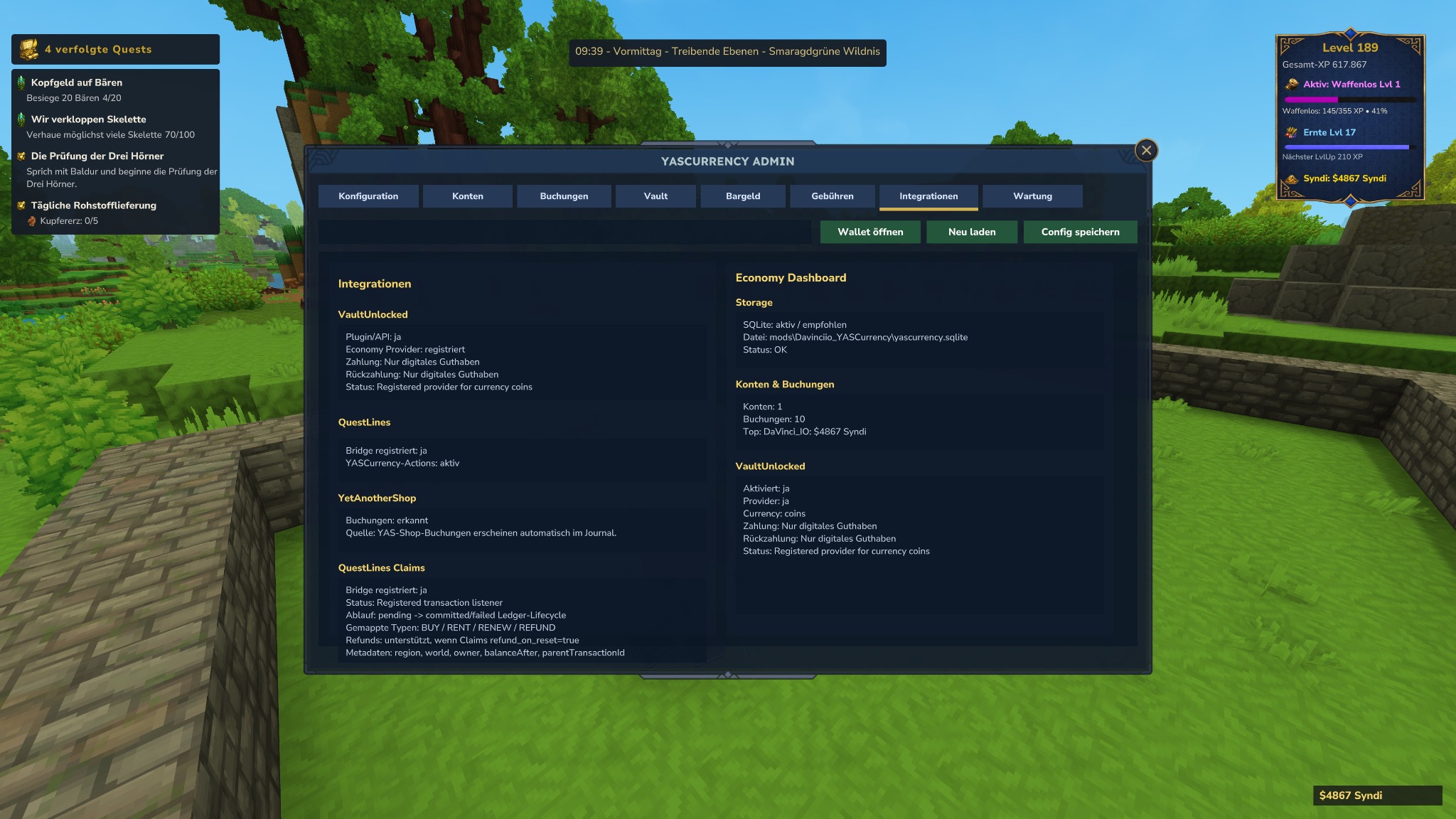
YASCurrency Admin Integrationen mit VaultUnlocked, QuestLines, YetAnotherShop und Claims
Admin / Integrationen: Status von VaultUnlocked, QuestLines, YetAnotherShop und QuestLines Claims inklusive Claim-Kauf, Miete, Renew und Refund-Metadaten.
Admin / Integrations: status of VaultUnlocked, QuestLines, YetAnotherShop and QuestLines Claims including claim purchase, rent, renew and refund metadata.
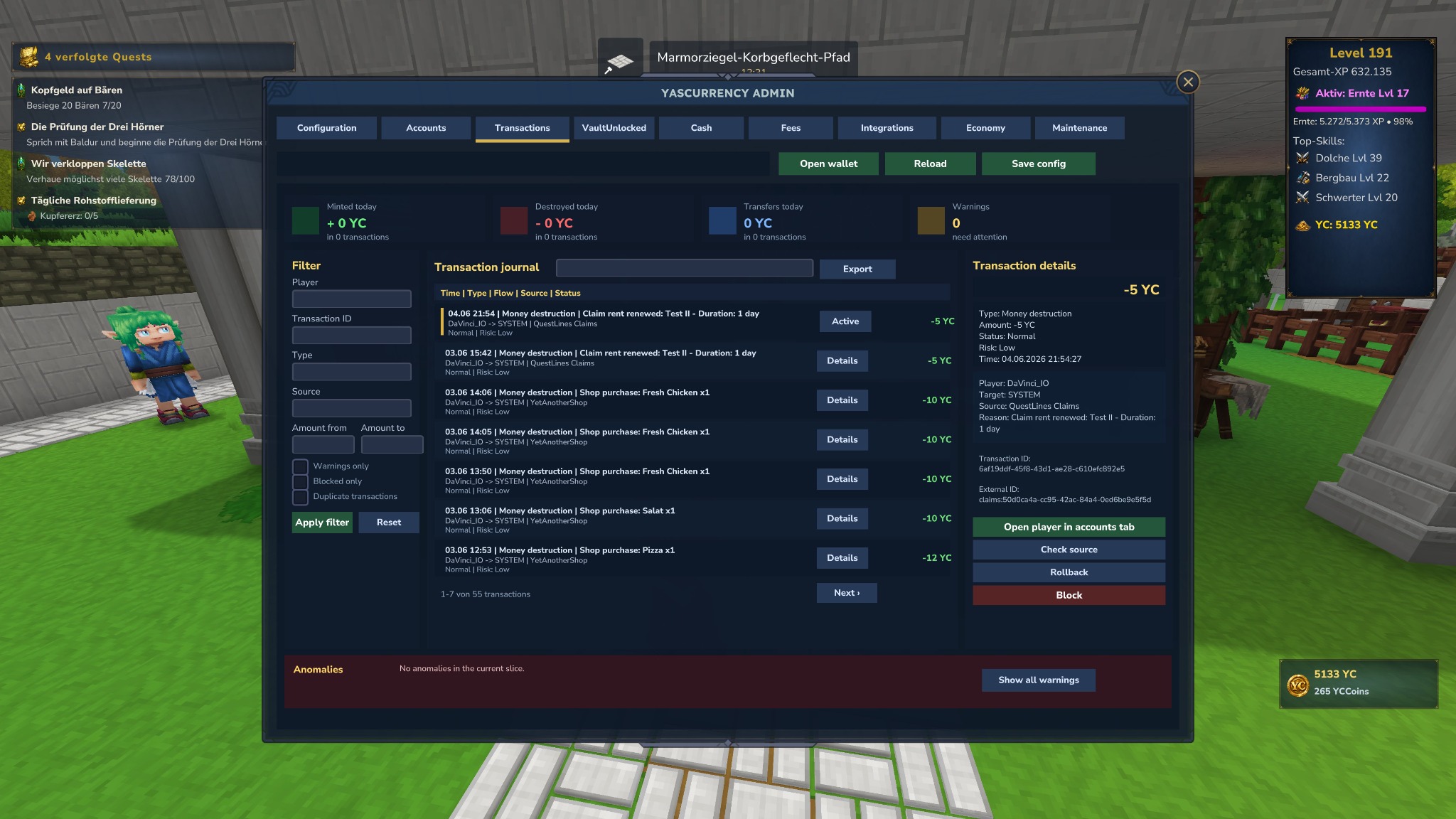
YASCurrency Admin Transaktionsüberwachung mit Details, Rückbuchung, Sperren und Journal
Admin / Transaktionen v1.65: globales Journal mit Details, Zeilen-Hervorhebung, Quellenprüfung, Rückbuchung, Sperren, Warnungen und rechtsbündigen Beträgen.
Admin / Transactions v1.65: global journal with details, row highlight, source check, rollback, blocking, warnings and right-aligned amounts.
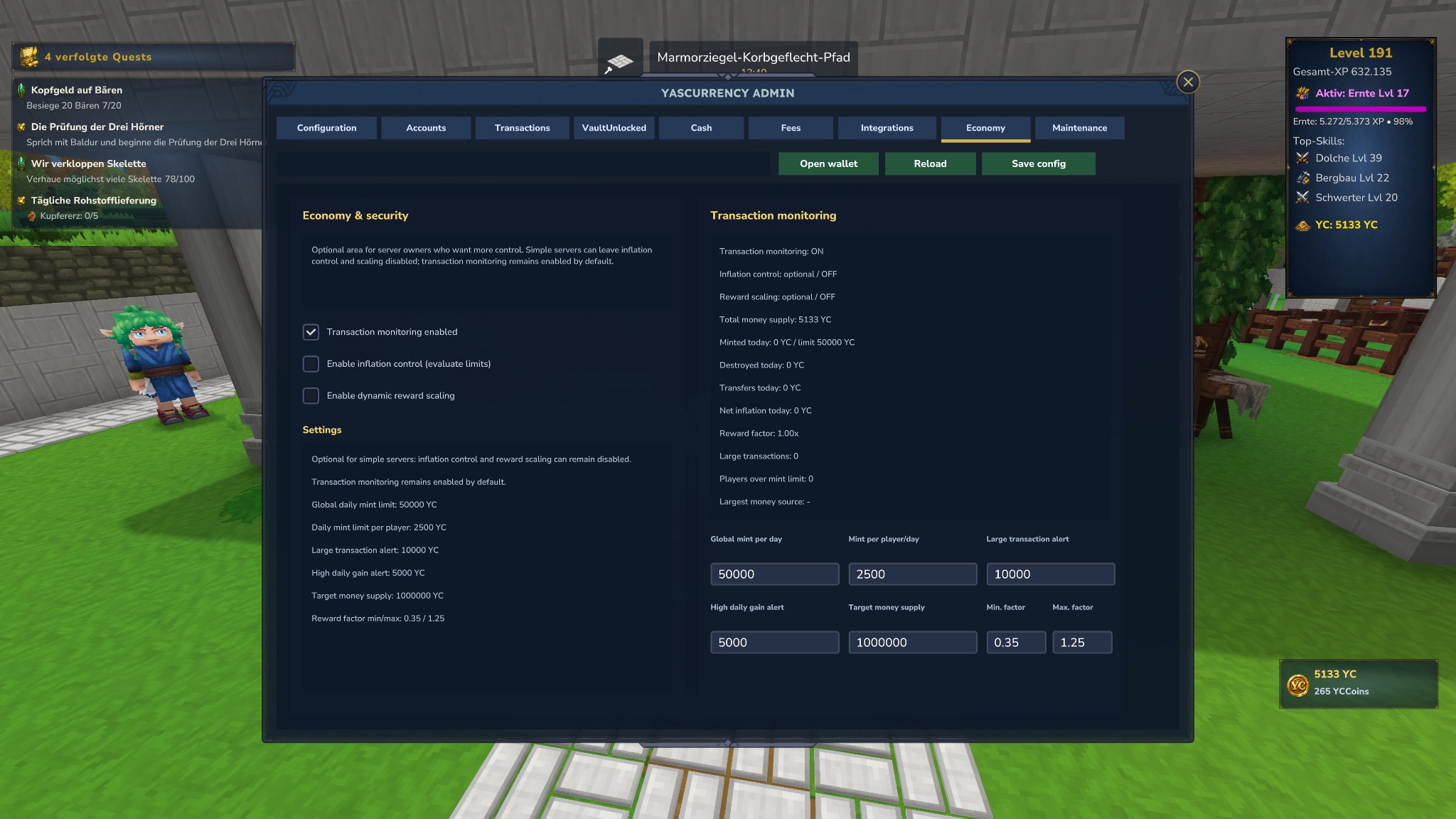
YASCurrency Admin Wirtschaft und Sicherheit mit Transaktionsüberwachung und Inflationskontrolle
Admin / Wirtschaft v1.65: optionaler Kontrollbereich für Transaktionsüberwachung, Inflationskontrolle, Belohnungsskalierung, Tageslimits, Ziel-Geldmenge und Warnschwellen.
Admin / Economy v1.65: optional control area for transaction monitoring, inflation control, reward scaling, daily limits, target supply and alert thresholds.

Endnutzer

End users

Spieler-Dokumentation

Player documentation

Dieser Bereich erklärt alle Funktionen, die normale Spieler im Konto sehen: Übersicht, Transaktionen, Transfers, Bargeld und Münzwerte.

This section explains all features regular players see in the account UI: overview, transactions, transfers, cash and coin values.

Kontoübersicht

Account overview

Die Übersicht ist die zentrale Konto-Seite. Sie zeigt dein digitales Guthaben, physisches Bargeld im Inventar und die letzte Aktivität.

The overview is the central account page. It shows your digital balance, physical cash in your inventory and latest activity.

  • Dein Guthaben: digitale Konto-Währung, die direkt von Shops oder Transfers genutzt werden kann.
  • Bargeld im Inventar: physische Münzen/Beutel, die du tragen, einzahlen, auszahlen oder in Shops als Bargeld einsetzen kannst.
  • Letzte Aktivität: Anzahl und Zeitpunkt der letzten sichtbaren Transaktionen. Interne Audit-Offsets für physisches Bargeld werden normalen Spielern nicht angezeigt.
  • Your balance: digital account currency used by shops and transfers.
  • Cash in inventory: physical coins/pouches that you can carry, deposit, withdraw or use as cash in shops.
  • Latest activity: count and timestamp of the latest visible transactions. Internal physical-cash audit offsets are not shown to regular players.

Transaktionen lesen

Reading transactions

Jede Buchung wird mit Icon, Titel, Uhrzeit und Betrag angezeigt. So können Spieler nachvollziehen, warum sich ihr Guthaben geändert hat.

Every booking is displayed with icon, title, time and amount, so players can understand why their balance changed.

  • Grün: Einnahmen wie Einzahlung, Reward, Refund oder PlayerShop-Auszahlung.
  • Rot: Ausgaben wie Shop-Kauf, Transfer, Auszahlung oder Gebühr.
  • Filter: Alle, Einnahmen oder Ausgaben.
  • Der Verlauf wird serverseitig gespeichert, ist paginiert und hilft auch beim Support.
  • Claim-Mieten zeigen die Region und, wenn Claims die Information liefert, auch die Dauer, z. B. Dauer: 1 Tag.
  • Green: income such as deposits, rewards, refunds or PlayerShop payouts.
  • Red: expenses such as shop purchases, transfers, withdrawals or fees.
  • Filters: all, income or expenses.
  • The history is stored server-side, paged and also helps with support.
  • Claim rent entries show the region and, when Claims provides it, also the duration, e.g. Duration: 1 day.

Gebühren, Steuern und Gesamtbeträge

Fees, taxes and totals

Wenn ein Server Gebühren oder Steuern aktiviert, werden sie im Hintergrund mit derselben Währung gebucht. Spieler sollen immer nachvollziehen können, warum mehr oder weniger Geld bewegt wurde.

When a server enables fees or taxes, they are booked in the same currency in the background. Players should always be able to understand why more or less money moved.

  • Shop-Käufe, Claim-Käufe, Claim-Mieten, Quest-Belohnungen, Transfers sowie Bargeld-Einzahlungen und -Auszahlungen können eigene Gebühren haben.
  • Die Wallet-Historie zeigt Gebühreninformationen, wenn der Vorgang eine strukturierte fee=...-Angabe enthält.
  • Bei QuestLines Claims kann ein Miet- oder Kaufpreis plus Gebühr abgezogen werden. Die Transaktion benennt Quelle, Grund und – falls verfügbar – Region/Dauer.
  • Alle Beträge bleiben ganze Währungseinheiten. Prozentuale Gebühren werden serverseitig gerundet.
  • Shop purchases, claim purchases, claim rents, quest rewards, transfers as well as cash deposits and withdrawals may have their own fees.
  • The wallet history shows fee information when the transaction contains a structured fee=... value.
  • For QuestLines Claims, a rent or purchase price plus fee can be withdrawn. The transaction names source, reason and – when available – region/duration.
  • All amounts remain whole currency units. Percentage fees are rounded server-side.

Transfers

Transfers

Wenn Spieler-Transfers vom Server aktiviert sind, kannst du Guthaben an andere Spieler senden.

If player transfers are enabled by the server, you can send balance to other players.

  • Empfänger: Online-Name oder UUID.
  • Betrag: muss innerhalb der Serverlimits liegen.
  • Notiz: optional, erscheint in der Transaktionshistorie.
  • Transfers sind digitale Kontobewegungen; physisches Bargeld wird dafür nicht automatisch aus dem Inventar genommen.
  • Recipient: online name or UUID.
  • Amount: must be within the server limits.
  • Note: optional, appears in the transaction history.
  • Transfers are digital account movements; physical cash is not automatically taken from inventory.

Balance-HUD

Balance HUD

Das Balance-HUD kann dauerhaft am Bildschirmrand angezeigt werden, wenn der Server die Funktion global aktiviert hat. Die eigentliche Platzierung und Darstellung stellst du im Wallet-Tab HUD selbst ein.

The Balance HUD can be shown at the edge of the screen when the server has enabled the feature globally. You configure the actual placement and display yourself in the wallet's HUD tab.

  • Vier stabile Positionen: oben links, oben rechts, unten links und unten rechts.
  • Offset X/Y wird live übernommen, damit du die Position direkt sehen kannst.
  • Du kannst digitales Guthaben, Bargeld im Inventar und das Currency-Icon einzeln ein- oder ausblenden.
  • Verfügbare Hintergründe: Standard, RPG und RPG hell.
  • Four stable positions: top left, top right, bottom left and bottom right.
  • X/Y offsets are applied live so you can see the placement immediately.
  • You can independently show or hide digital balance, cash in inventory and the currency icon.
  • Available backgrounds: Standard, RPG and RPG light.

Persönliche Wallet-Sprache

Personal wallet language

Die Kontooberfläche besitzt eine eigene Sprachwahl. Sie ändert die Sprache des jeweiligen Spielers und nicht die globale Serversprache.

The account UI has its own language selector. It changes the language for the individual player and not the global server language.

  • Die Auswahl wird pro Spieler gespeichert.
  • Deutsch und Englisch sind aktuell vorgesehen.
  • Die Admin-Standardsprache bleibt der Fallback für neue Spieler oder Spieler ohne gespeicherte Präferenz.
  • The selection is stored per player.
  • German and English are currently available.
  • The admin default language remains the fallback for new players or players without a saved preference.

Was Spieler bei digitalem Geld und Bargeld wissen müssen

What players need to know about digital money and cash

BereichAreaErklärungExplanation
Digitales KontoDigital accountWird für Shops, Transfers, VaultUnlocked-Zahlungen, Quest-Rewards und Claims genutzt.Used for shops, transfers, VaultUnlocked payments, quest rewards and claims.
BargeldCashLiegt als physisches Item im Inventar. Es kann eingezahlt, ausgezahlt, gewechselt, optimiert oder von Bargeld-Aktionen verwendet werden.Exists as physical inventory items. It can be deposited, withdrawn, changed, optimized or used by cash actions.
GebührenFeesKönnen je nach Server für Transfer, Shop, PlayerShop, Bargeld, Quest-Rewards oder Claims aktiviert sein.Can be enabled by the server for transfer, shop, PlayerShop, cash, quest rewards or claims.
TransaktionsverlaufTransaction historyZeigt Einnahmen und Ausgaben paginiert. Moderne Integrationen schreiben strukturierte Quellen und externe IDs, damit Support und Rückfragen nachvollziehbar bleiben.Shows income and expenses in pages. Modern integrations write structured sources and external IDs so support and follow-up questions remain traceable.

Physisches Bargeld

Physical cash

SyndiCash, Münzen und Wechselgeld

SyndiCash, coins and change

YASCurrency unterstützt neben digitalem Guthaben auch physische Wertträger im Inventar. Diese können eingezahlt, ausgezahlt, gewechselt und von anderen Mods als Bargeld-Zahlung verwendet werden.

YASCurrency supports physical value items in addition to digital balance. They can be deposited, withdrawn, exchanged and used by other mods as cash payments.

Bargeld verwalten

Manage cash

  • Auszahlen: digitales Guthaben wird in physische Münzen/Beutel umgewandelt.
  • Alles einzahlen: alle registrierten Bargeld-Items im Inventar werden zum Konto addiert.
  • Hand einzahlen: nur der gehaltene Bargeld-Stack wird eingezahlt.
  • Optimieren: Bargeld wird in eine sinnvolle Stückelung umgewandelt.
  • Withdraw: digital balance is converted into physical coins/pouches.
  • Deposit all: all registered cash items in inventory are added to the account.
  • Deposit hand: only the held cash stack is deposited.
  • Optimize: cash is converted into useful denominations.

Münzen wechseln / aufbrechen

Exchange / split coins

Quelle und Ziel werden per Dropdown gewählt, damit keine ungültigen Münznamen eingegeben werden. Die Anzahl bestimmt, wie viele Quellmünzen verarbeitet werden.

Source and target are selected via dropdown to avoid invalid coin names. Count defines how many source coins are processed.

  • Aufbrechen: wandelt die gesamte Quellmenge exakt in kleinere Zielmünzen um.
  • Wechseln: erzeugt eine gewünschte Zielmenge und gibt den Rest optimal zurück.
  • Beispiel: 1x Cobalt → Copper ergibt 100x Copper.
  • Split: converts the full source amount exactly into smaller target coins.
  • Change: creates the requested target count and returns the remainder optimally.
  • Example: 1x Cobalt → Copper results in 100x Copper.

Dynamische Cash-Item-Tooltips

Dynamic cash item tooltips

Seit der Update-5-ItemStack-Metadata nutzt YASCurrency pro Stack eigene Namen und Beschreibungen. Neu erstellte oder normalisierte Bargeld-Items können dadurch den aktuellen Cash-Namen und den aktuellen Wert aus der Config anzeigen.

Using the Update 5 item stack metadata system, YASCurrency can assign per-stack names and descriptions. Newly created or normalized cash items can therefore show the current cash name and value from config.

  • Beispielname: Gold Narniacashis
  • Beispielbeschreibung: Physisches Bargeld im Wert von 50 Narniacashis.
  • Bestehende Stacks werden bei Wallet-/Cash-Aktionen normalisiert, sobald sie verarbeitet werden.
  • Example name: Gold Narniacashis
  • Example description: Physical cash worth 50 Narniacashis.
  • Existing stacks are normalized during wallet/cash actions once they are processed.

Standard-Wertstufen

Default denominations

Serveradmins können die Werte im Admin-Panel ändern. Icons sind wertneutral; wenn ihr andere Werte dauerhaft nutzt, sollten Icons und Dokumentation entsprechend angepasst werden.

Server admins can change the values in the admin panel. Icons are value-neutral; if you permanently use different values, icons and documentation should be adjusted accordingly.

Pouch5000 Adamantite1000 Thorium500 Cobalt100 Gold50 Silver10 Iron5 Copper1

Serveradmins

Server admins

Admin-Dokumentation

Admin documentation

Admins mit yascurrency.admin konfigurieren Währung, HUD, Standardsprache, Transferlimits, Gebühren, physisches Bargeld, Wertstufen, Integrationen, Transaktionsüberwachung, Wirtschaftskontrolle, Storage-Diagnose und Journal-Wartung. Spielerbezogene Änderungen werden protokolliert.

Admins with yascurrency.admin configure currency, HUD, default language, transfer limits, fees, physical cash, denominations, integrations, transaction monitoring, economy control, storage diagnostics and journal maintenance. Player-related changes are logged.

Admin-Panel Bereiche

Admin panel areas

BereichAreaZweckPurposeWichtigImportant
KonfigurationConfigurationCurrency Key, Anzeigename, Symbol, Startguthaben, HUD, Standardsprache und Spieler-Transfers.Currency key, display name, symbol, starting balance, HUD, default language and player transfers.YASCurrency v1 arbeitet mit einer aktiven Server-Währung. Der Currency Key sollte nach Live-Start stabil bleiben.YASCurrency v1 works with one active server currency. The currency key should remain stable after launch.
KontenAccountsBalance Tool für Geben, Nehmen und Setzen per Online-Name oder UUID; Top-Konten als Kontrollblick.Balance tool for giving, taking and setting by online name or UUID; top accounts as control overview.Aktionen verändern das digitale Konto direkt und werden im Journal gespeichert.Actions directly modify the digital account and are stored in the journal.
TransaktionenTransactionsGlobales Transaktionsjournal mit Suche nach Spieler, UUID, Typ, Quelle oder Grund, Detailansicht, Quellenprüfung, Rückbuchung und Sperren.Global transaction journal with search by player, UUID, type, source or reason, detail view, source check, rollback and blocking.Das Journal ist paginiert. Interne Cash-Audit-Offsets werden in Spieleransichten ausgeblendet.The journal is paged. Internal cash audit offsets are hidden in player views.
VaultUnlockedVaultUnlockedVaultUnlocked aktivieren, Provider registrieren, Currency-ID und Payment-/Refund-Modus setzen.Enable VaultUnlocked, register provider, set currency ID and payment/refund mode.YASCurrency ersetzt VaultUnlocked nicht als API, sondern stellt den Economy-Provider dahinter bereit.YASCurrency does not replace VaultUnlocked as an API; it provides the economy provider behind it.
BargeldCashPhysisches Bargeld aktivieren, Profil/Namen setzen, Einzahlen/Auszahlen/Droppen erlauben und Wertstufen konfigurieren.Enable physical cash, set profile/names, allow deposit/withdraw/drop and configure denominations.Wertstufen sind ganzzahlige Werte. Speichern und neu laden übernimmt Änderungen sauber.Denominations are whole-number values. Save and reload applies changes cleanly.
GebührenFeesTransfer-, Shop-, PlayerShop-, Auszahlungs-, Einzahlungs-, Quest-Reward- und Claim-Gebühren als Prozentwerte.Transfer, shop, PlayerShop, withdrawal, deposit, quest reward and claim fees as percentages.Berechnete Gebühren/Steuern werden auf ganze Währungseinheiten gerundet, damit Bargeld konsistent bleibt.Calculated fees/taxes are rounded to whole currency units so cash remains consistent.
IntegrationenIntegrationsStatus für VaultUnlocked, QuestLines, YetAnotherShop und QuestLines Claims.Status for VaultUnlocked, QuestLines, YetAnotherShop and QuestLines Claims.Claims-Kauf/Miete/Renew/Refund werden über VaultUnlocked abgebucht und im YASCurrency-Journal angereichert.Claims purchase/rent/renew/refund are charged through VaultUnlocked and enriched in the YASCurrency journal.
WirtschaftEconomyOptionale Kontrolle für Transaktionsüberwachung, Inflationskontrolle, Belohnungsskalierung, Geldschöpfungs-Limits, Ziel-Geldmenge und Warnschwellen.Optional control for transaction monitoring, inflation control, reward scaling, mint limits, target money supply and alert thresholds.Transaktionsüberwachung bleibt standardmäßig aktiv; harte Limits greifen erst, wenn Inflationskontrolle aktiviert ist.Transaction monitoring remains enabled by default; hard limits only apply when inflation control is enabled.
SpeicherStorageAktives Backend prüfen, SQLite oder MariaDB anzeigen, Health-Snapshot lesen und Migration vorbereiten.Check the active backend, show SQLite or MariaDB, read the health snapshot and prepare migration.SQLite bleibt Standard. MariaDB ist optional und wird nur per storage.type=mariadb aktiviert.SQLite remains the default. MariaDB is optional and is only enabled via storage.type=mariadb.
WartungMaintenanceBackups, Journal aller Spieler leeren, Journal eines Spielers leeren und alte Buchungen bereinigen.Backups, clear all players' journal, clear one player's journal and prune old bookings.Vor Lösch- und Bereinigungsaktionen wird automatisch ein Backup erstellt.A backup is created automatically before clear and prune actions.

Eine aktive Currency

One active currency

YASCurrency v1 ist bewusst als eine aktive Server-Währung mit digitalem Konto und optionalem physischem Bargeldprofil aufgebaut.

YASCurrency v1 is intentionally built around one active server currency with digital accounts and an optional physical cash profile.

  • Beispiel: coins als technischer Key, Syndi als Anzeigename und $ als Symbol.
  • Das Bargeldprofil syndi bildet dieselbe Währung als Münzen/Beutel im Inventar ab.
  • Mehrere parallele Währungen sind nicht Teil der v1-Architektur und sollten nicht in der Dokumentation versprochen werden.
  • Example: coins as technical key, Syndi as display name and $ as symbol.
  • The cash profile syndi represents the same currency as coins/pouches in the inventory.
  • Multiple parallel currencies are not part of the v1 architecture and should not be promised in documentation.

Speichern, Reload und Wirkung

Save, reload and effect

Änderungen im Admin-Panel werden mit Config speichern persistiert. Für Cash-Werte gilt: speichern und neu laden, damit serverseitige Werte, UI und Item-Logik konsistent sind.

Changes in the admin panel are persisted with Save config. For cash values, save and reload so server-side values, UI and item logic stay consistent.

  • Startguthaben wirkt nur auf neue Konten.
  • Balance Tool arbeitet direkt auf bestehenden Konten.
  • Gebühren sollten vor Live-Betrieb mit kleinen Beträgen getestet werden.
  • Die Wallet-Sprache im Konto ist pro Spieler; die Standardsprache im Admin-Panel ist nur der Fallback.
  • Starting balance only affects new accounts.
  • The balance tool directly modifies existing accounts.
  • Fees should be tested with small amounts before live operation.
  • The wallet language in the account is per player; the admin default language is only the fallback.

Balance-HUD Freigabe

Balance HUD availability

Der Admin aktiviert oder deaktiviert nur noch die Balance-HUD-Funktion global. Die konkrete Position legt jeder Spieler im Wallet selbst fest. Die sichere Standardposition ist unten rechts.

The admin now only enables or disables the Balance HUD feature globally. Each player configures the actual position in their wallet. The safe default is bottom right.

  • Spielerpositionen: oben links, oben rechts, unten links, unten rechts.
  • Offset X/Y, Anzeigeoptionen und Hintergrund werden pro Spieler gespeichert.
  • Wenn das HUD global deaktiviert ist, ist der HUD-Tab im Wallet nicht verfügbar.
  • Player positions: top left, top right, bottom left, bottom right.
  • X/Y offsets, display options and background are saved per player.
  • If the HUD is disabled globally, the wallet HUD tab is not available.

Transaktionskontrolle und Eingriffe

Transaction control and interventions

Der Transaktionen-Tab ist die zentrale Kontrollstelle für den Geldfluss. Er zeigt globale Buchungen, Details, Quellen, externe IDs, Risiko, Warnungen und Aktionen.

The transactions tab is the central control point for money flow. It shows global entries, details, sources, external IDs, risk, warnings and actions.

  • Details: markiert die Zeile und zeigt den Vorgang rechts vollständig an.
  • Spieler im Konten-Tab öffnen: springt zum Konto, damit Kontostand und Spielerhistorie geprüft werden können.
  • Rückbuchung: erfolgt als Gegenbuchung und löscht keinen bestehenden Ledger-Eintrag.
  • Sperren: blockiert Quelle oder externe ID für weitere auffällige Flows.
  • Details: highlights the row and shows the full transaction on the right.
  • Open player in accounts tab: jumps to the account so balance and player history can be checked.
  • Rollback: is written as a counter-transaction and does not delete an existing ledger entry.
  • Block: blocks source or external ID for further suspicious flows.

Wirtschaft und Sicherheit

Economy and security

Der Wirtschaftsbereich ist optional für Serverbetreiber, die mehr Kontrolle möchten. Einfache Server können Inflationskontrolle und Skalierung ausgeschaltet lassen.

The economy area is optional for server owners who want more control. Simple servers can leave inflation control and scaling disabled.

  • Transaktionsüberwachung bleibt standardmäßig aktiv.
  • Inflationskontrolle wertet Geldschöpfungsgrenzen aus und kann je nach Modus warnen, reduzieren oder blockieren.
  • Belohnungsskalierung kann Rewards dynamisch an Ziel-Geldmenge und Faktorgrenzen anpassen.
  • Warnschwellen helfen, große Transaktionen und ungewöhnliche Tagesgewinne zu finden.
  • Transaction monitoring remains enabled by default.
  • Inflation control evaluates mint limits and can warn, reduce or block depending on mode.
  • Reward scaling can dynamically adjust rewards around target money supply and factor limits.
  • Alert thresholds help find large transactions and unusual daily gains.

Admin-Buchungen lesen

Reading admin bookings

Der Admin-Bereich zeigt globale Buchungen mit Quelle und Grund. Das ist absichtlich technischer als die Spieler-Wallet, damit Supportfälle nachvollzogen werden können.

The admin area shows global bookings with source and reason. This is intentionally more technical than the player wallet so support cases can be traced.

  • Quelle: z. B. YASCurrency, YetAnotherShop, QuestLines oder QuestLines Claims.
  • Typ: Einzahlung, Auszahlung, Shop, Bargeld, Refund, Penalty oder Systembuchung.
  • Pagination: verhindert, dass lange Journale aus dem UI laufen.
  • Source: e.g. YASCurrency, YetAnotherShop, QuestLines or QuestLines Claims.
  • Type: deposit, withdraw, shop, cash, refund, penalty or system booking.
  • Pagination: prevents long journals from overflowing the UI.

Wartung

Maintenance

Backups, Journal-Reset und Retention

Backups, journal reset and retention

Das Buchungsjournal wächst auf aktiven Servern dauerhaft. YASCurrency ergänzt deshalb Wartungsfunktionen, damit Admins kontrolliert sichern, leeren und bereinigen können, ohne Kontostände zu verändern.

The booking journal grows continuously on active servers. YASCurrency therefore adds maintenance tools so admins can safely back up, clear and prune without changing balances.

Verfügbare Wartungsaktionen

Available maintenance actions

  • Backup erstellen: legt bei SQLite eine Kopie der lokalen Datenbankdatei an. Bei MariaDB sollte zusätzlich ein externer Datenbankdump eingeplant werden.
  • Journal aller Spieler leeren: entfernt alle Transaktionen, lässt Kontostände aber unverändert.
  • Journal eines Spielers leeren: entfernt nur die Buchungen eines bestimmten Spielers.
  • Journal bereinigen: behält nur die letzten X Einträge pro Spieler.
  • Spieler-Journal bereinigen: behält nur die letzten X Einträge für einen einzelnen Spieler.
  • Create backup: creates a copy of the local database file for SQLite. For MariaDB, plan an additional external database dump.
  • Clear all players' journal: removes all transactions but leaves balances unchanged.
  • Clear one player's journal: removes only the bookings of a specific player.
  • Prune journal: keeps only the latest X entries per player.
  • Prune player journal: keeps only the latest X entries for one player.

Sicherheitsverhalten

Safety behavior

Wartungsaktionen sind absichtlich vorsichtig gebaut, weil ein Journal-Reset Support- und Audit-Daten entfernt.

Maintenance actions are intentionally careful because a journal reset removes support and audit data.

  • Lösch- und Bereinigungsaktionen verlangen eine Bestätigung.
  • Vor dem Löschen oder Bereinigen wird automatisch ein Backup erstellt; bei MariaDB sollte zusätzlich ein mysqldump oder Provider-Backup genutzt werden.
  • Die Tabelle accounts bleibt unverändert; nur transactions wird bereinigt.
  • Für Supportfälle sollte vor großen Resets zusätzlich ein manueller Backup-Download/Archivschritt erfolgen.
  • Clear and prune actions require confirmation.
  • A backup is created automatically before clearing or pruning; for MariaDB also use mysqldump or your provider backup.
  • The accounts table stays unchanged; only transactions is pruned.
  • For support cases, make an additional manual backup/export before large resets.

Empfohlene Limits

Recommended limits

Für normale Spieler reichen 1.000 sichtbare/gespeicherte Transaktionen meistens aus. Große Server können höhere Werte setzen, sollten aber Datenbankgröße und Supportbedarf beobachten.

For regular players, 1,000 visible/stored transactions are usually enough. Large servers can use higher values but should monitor database size and support needs.

SzenarioScenarioEmpfehlungRecommendationHinweisNote
StandardserverStandard serverjournal.maxTransactionsPerPlayer=1000Guter Default für Spielerhistorie und UI-Performance.Good default for player history and UI performance.
Power-ServerPower serverjournal.maxTransactionsPerPlayer=5000Für sehr aktive Wirtschaften mit vielen Shops und Claims.For very active economies with many shops and claims.
Globales Admin-JournalGlobal admin journaljournal.globalMaxEntries=200000Typischer Bereich: 100.000 bis 250.000 Einträge.Typical range: 100,000 to 250,000 entries.
AufbewahrungRetentionjournal.retentionDays=18090 oder 180 Tage sind sinnvolle Live-Server-Werte.90 or 180 days are sensible live-server values.
DeaktivierenDisable0Bei globalem Limit oder Retention bedeutet 0: keine automatische Begrenzung.For global limit or retention, 0 means no automatic limit.

Speicher-Backend

Storage backend

SQLite bleibt Standard, MariaDB ist optional

SQLite remains the default, MariaDB is optional

YASCurrency speichert Konten, Transaktionen und Metadaten standardmäßig in SQLite. Ab v1.67 kann MariaDB bewusst als alternatives Backend genutzt werden, z. B. für größere Server, externe Datenbank-Backups oder Hosting-Setups mit zentraler Datenbankverwaltung.

YASCurrency stores accounts, transactions and metadata in SQLite by default. Starting with v1.67, MariaDB can deliberately be used as an alternative backend, for example for larger servers, external database backups or hosting setups with central database management.

Backend-Übersicht

Backend overview

  • SQLite: Standard, keine externe Datenbank nötig, ideal für normale Single-Server-Installationen.
  • MariaDB: optional, muss explizit mit storage.type=mariadb aktiviert werden.
  • Beide Backends nutzen dieselbe YASCurrency-Logik für Konten, Transfers, Bargeld, Gebühren, Journal und API.
  • Ein ungültiger Storage-Typ fällt auf SQLite zurück. Wenn MariaDB bewusst gewählt wurde und nicht erreichbar ist, sollte der Fehler behoben werden statt still weiterzuarbeiten.
  • SQLite: default, no external database required, ideal for regular single-server installations.
  • MariaDB: optional, must be explicitly enabled with storage.type=mariadb.
  • Both backends use the same YASCurrency logic for accounts, transfers, cash, fees, journal and API.
  • An invalid storage type falls back to SQLite. If MariaDB was deliberately selected and cannot be reached, fix the error instead of silently continuing.

Was YASCurrency automatisch erstellt

What YASCurrency creates automatically

YASCurrency kann bei mariadb.autoCreateTables=true die benötigten Tabellen innerhalb einer vorhandenen Datenbank anlegen. Die Datenbank selbst, der MariaDB-Benutzer und dessen Rechte sollten vom Serveradmin oder Hoster vorbereitet werden.

With mariadb.autoCreateTables=true, YASCurrency can create the required tables inside an existing database. The database itself, the MariaDB user and its permissions should be prepared by the server admin or host.

  • Datenbank anlegen: Admin/Hoster.
  • User und Passwort anlegen: Admin/Hoster.
  • Rechte auf die Datenbank vergeben: Admin/Hoster.
  • Tabellen für Accounts, Transactions und Meta: YASCurrency, wenn Auto-Create aktiv ist.
  • Create database: admin/host.
  • Create user and password: admin/host.
  • Grant permissions on the database: admin/host.
  • Tables for accounts, transactions and meta: YASCurrency, when auto-create is enabled.

MariaDB vorbereiten

Prepare MariaDB

Beispiel für eine lokale MariaDB-Installation. Passe Datenbankname, Benutzer, Host und Passwort an deine Umgebung an.

Example for a local MariaDB installation. Adjust database name, user, host and password for your environment.

CREATE DATABASE yascurrency
  CHARACTER SET utf8mb4
  COLLATE utf8mb4_unicode_ci;

CREATE USER 'yascurrency'@'localhost' IDENTIFIED BY 'change-me';
GRANT ALL PRIVILEGES ON yascurrency.* TO 'yascurrency'@'localhost';
FLUSH PRIVILEGES;

Für einen entfernten Datenbankserver wird der Host-Teil des Users passend zum Setup gesetzt, z. B. auf die Server-IP oder auf %, wenn dein Hoster das so vorsieht. Nutze % nicht unnötig offen auf öffentlich erreichbaren Datenbanken.

For a remote database server, set the host part of the user according to your setup, for example to the game server IP or to % if your host requires it. Do not use % unnecessarily on publicly reachable databases.

MariaDB-Config

MariaDB configuration

SQLite bleibt aktiv, solange storage.type auf sqlite steht oder nicht geändert wurde. Für MariaDB wird bewusst umgestellt:

SQLite stays active as long as storage.type is set to sqlite or has not been changed. For MariaDB, switch deliberately:

storage.type=mariadb

mariadb.host=localhost
mariadb.port=3306
mariadb.database=yascurrency
mariadb.username=yascurrency
mariadb.password=change-me
mariadb.useSsl=false
mariadb.connectionTimeoutMs=5000
mariadb.autoCreateTables=true

Storage prüfen

Check storage

Nach Start oder Migration sollte zuerst der Storage-Status geprüft werden. Der Befehl zeigt aktives Backend, Speicherziel, Health, Account-Anzahl, Transaction-Anzahl und Geldmenge.

After startup or migration, check the storage status first. The command shows active backend, storage target, health, account count, transaction count and money supply.

/yascurrency storage test
/yascurrency storage status

Im Admin-Panel wird derselbe Storage-Health-Snapshot gecacht, damit Tab-Wechsel nicht ständig teure Datenbankabfragen auslösen.

The admin panel uses the same cached storage health snapshot so switching tabs does not repeatedly trigger expensive database queries.

Migrations-Guide: SQLite → MariaDB

Migration guide: SQLite → MariaDB

Die Migration ist absichtlich ein expliziter Admin-Schritt. YASCurrency migriert nicht automatisch beim Serverstart und schaltet danach auch nicht automatisch auf MariaDB um. Dadurch bleibt ein bestehender Live-Server kontrollierbar.

The migration is intentionally an explicit admin step. YASCurrency does not automatically migrate during server startup and does not automatically switch to MariaDB afterwards. This keeps an existing live server under control.

  1. Server mit SQLite starten und prüfen, dass die Wirtschaft normal funktioniert.
  2. MariaDB-Datenbank, User und Rechte vorbereiten.
  3. MariaDB-Werte in der Config eintragen, aber storage.type=sqlite zunächst beibehalten.
  4. Migration ausführen: /yascurrency storage migrate sqlite-to-mariadb.
  5. Ergebnis prüfen. Der Befehl erstellt vorher ein SQLite-Backup, importiert Accounts, Transactions und Meta-Daten und vergleicht Account-Anzahl, Transaction-Anzahl und Total Money Supply.
  6. Nur bei Status OK auf MariaDB umstellen: storage.type=mariadb.
  7. Server neu starten und mit /yascurrency storage test prüfen, ob MariaDB aktiv ist.
  8. Erst danach Live-Betrieb fortsetzen und die alte SQLite-Datei als Sicherheitsbackup archivieren.
  1. Start the server with SQLite and verify that the economy works normally.
  2. Prepare the MariaDB database, user and permissions.
  3. Enter the MariaDB values in the config, but keep storage.type=sqlite for now.
  4. Run the migration: /yascurrency storage migrate sqlite-to-mariadb.
  5. Check the result. The command creates a SQLite backup first, imports accounts, transactions and meta data and compares account count, transaction count and total money supply.
  6. Only when the status is OK, switch to MariaDB: storage.type=mariadb.
  7. Restart the server and use /yascurrency storage test to verify that MariaDB is active.
  8. Only then continue live operation and archive the old SQLite file as a safety backup.

Wenn die Migration mit WARNING endet oder MariaDB bereits Daten enthält, nicht umschalten. Erst Ursache prüfen, Ziel-Datenbank leeren oder eine neue Datenbank verwenden und erneut migrieren.

If the migration ends with WARNING or MariaDB already contains data, do not switch. Check the cause first, clear the target database or use a new database and migrate again.

Befehle

Commands

Aktuelle Chat- und Konsolenbefehle

Current chat and console commands

Der Hauptbefehl ist /yascurrency. Der kurze Alias ist /ycur.

The main command is /yascurrency. The short alias is /ycur.

BefehlBerechtigungBeschreibung
/yascurrency
/ycur
SpielerÖffnet das Konto. Gleichwertige Subcommands: open, wallet, panel, ui.
/yascurrency helpSpielerZeigt die Hilfe.
/yascurrency balance
/yascurrency bal
SpielerZeigt das eigene digitale Guthaben im Chat. Admins/Konsole können optional einen Spieler angeben.
/yascurrency pay <OnlineName|UUID> <Betrag>SpielerSendet digitales Guthaben an einen Spieler, wenn Spieler-Transfers erlaubt sind. Beträge sind ganze Währungseinheiten.
/yascurrency cash value [syndi]
/yascurrency cashvalue [syndi]
/yascurrency pocket [syndi]
SpielerZeigt den Wert des physischen Bargelds im Inventar.
/yascurrency cash withdraw <Betrag> [syndi]
/yascurrency cash withdraw syndi <Betrag>
SpielerZahlt digitales Guthaben als physisches Bargeld aus.
/yascurrency cash deposit all [syndi]
/yascurrency cash deposit hand [syndi]
SpielerZahlt alles Bargeld oder nur das Bargeld in der Hand wieder auf das digitale Konto ein.
/yascurrency cash exchange [syndi]
/yascurrency cash optimize [syndi]
SpielerOptimiert Bargeld im Inventar in möglichst passende/größere Wertstufen.
/yascurrency cash split <Quelle> <Menge> <Ziel> [syndi]SpielerBricht eine Wertstufe vollständig in kleinere Einheiten auf, z. B. /ycur cash split Silver 10 Copper.
/yascurrency cash change <Quelle> <Menge> <Ziel> <Zielmenge> [syndi]SpielerErzeugt eine Zielmenge und gibt den Rest als optimiertes Wechselgeld zurück, z. B. /ycur cash change Silver 10 Copper 20.
/yascurrency adminyascurrency.adminÖffnet das Admin-Panel.
/yascurrency give <Betrag> <OnlineName|UUID> [questId] [Label...]
/yascurrency give <OnlineName|UUID> <Betrag> [Label...]
yascurrency.adminSchreibt einem digitalen Konto Guthaben gut.
/yascurrency take <Betrag> <OnlineName|UUID> [questId] [Label...]
/yascurrency take <OnlineName|UUID> <Betrag> [Label...]
yascurrency.adminBucht digitales Guthaben von einem Konto ab.
/yascurrency set <Betrag> <OnlineName|UUID> [questId] [Label...]
/yascurrency set <OnlineName|UUID> <Betrag> [Label...]
yascurrency.adminSetzt einen digitalen Kontostand direkt.
/yascurrency cash give <Betrag> <OnlineName|UUID> [questId] [syndi]yascurrency.adminGibt einem online Spieler physisches Bargeld als Reward.
/yascurrency reloadyascurrency.adminLädt Config und Sprache neu.
/yascurrency statsyascurrency.adminZeigt Konten- und Währungsinformationen.
/yascurrency storage test
/yascurrency storage status
yascurrency.adminZeigt aktives Storage-Backend, Health, Accounts, Transactions und Total Supply.
/yascurrency storage migrate sqlite-to-mariadbyascurrency.adminMigriert eine bestehende SQLite-Datenbank explizit in eine leere MariaDB-Zieldatenbank. Schaltet nicht automatisch um.
/yascurrency adminWartungyascurrency.adminÖffnet Backup-, Journal-Leeren- und Journal-Bereinigungsfunktionen im Admin-Panel.
CommandPermissionDescription
/yascurrency
/ycur
PlayerOpens the account. Equivalent subcommands: open, wallet, panel, ui.
/yascurrency helpPlayerShows help.
/yascurrency balance
/yascurrency bal
PlayerShows your digital balance in chat. Admins/console may optionally provide a player.
/yascurrency pay <OnlineName|UUID> <amount>PlayerSends digital balance to another player if player transfers are enabled. Amounts are whole currency units.
/yascurrency cash value [syndi]
/yascurrency cashvalue [syndi]
/yascurrency pocket [syndi]
PlayerShows the value of physical cash in your inventory.
/yascurrency cash withdraw <amount> [syndi]
/yascurrency cash withdraw syndi <amount>
PlayerWithdraws digital balance as physical cash.
/yascurrency cash deposit all [syndi]
/yascurrency cash deposit hand [syndi]
PlayerDeposits all cash or only the cash item in hand back into the digital account.
/yascurrency cash exchange [syndi]
/yascurrency cash optimize [syndi]
PlayerOptimizes physical cash in your inventory into suitable/larger denominations.
/yascurrency cash split <source> <count> <target> [syndi]PlayerSplits a denomination fully into smaller target coins, e.g. /ycur cash split Silver 10 Copper.
/yascurrency cash change <source> <count> <target> <targetCount> [syndi]PlayerCreates a target count and returns the remainder as optimized change, e.g. /ycur cash change Silver 10 Copper 20.
/yascurrency adminyascurrency.adminOpens the admin panel.
/yascurrency give <amount> <OnlineName|UUID> [questId] [label...]
/yascurrency give <OnlineName|UUID> <amount> [label...]
yascurrency.adminCredits a digital account.
/yascurrency take <amount> <OnlineName|UUID> [questId] [label...]
/yascurrency take <OnlineName|UUID> <amount> [label...]
yascurrency.adminDebits a digital account.
/yascurrency set <amount> <OnlineName|UUID> [questId] [label...]
/yascurrency set <OnlineName|UUID> <amount> [label...]
yascurrency.adminDirectly sets a digital account balance.
/yascurrency cash give <amount> <OnlineName|UUID> [questId] [syndi]yascurrency.adminGives physical cash as a reward to an online player.
/yascurrency reloadyascurrency.adminReloads config and language.
/yascurrency statsyascurrency.adminShows account and currency information.
/yascurrency storage test
/yascurrency storage status
yascurrency.adminShows active storage backend, health, accounts, transactions and total supply.
/yascurrency storage migrate sqlite-to-mariadbyascurrency.adminExplicitly migrates an existing SQLite database into an empty MariaDB target database. Does not switch automatically.
/yascurrency adminMaintenanceyascurrency.adminOpens backup, journal clear and journal prune tools in the admin panel.

Java API

Java API

API v4 für andere Mods

API v4 for other mods

YASCurrency kann als direkte Maven-Dependency oder optional per Reflection genutzt werden. Für optionale Integrationen immer zuerst isAvailable() prüfen. API v4 beschreibt die aktuellen Features: eine aktive Server-Währung, ganze Beträge, physisches Bargeld, dynamische Cash-Tooltips, Transaktions-DTOs, Spielerpräferenzen, Balance-HUD-Helper, QuestLines-Cash, Journal-Wartung sowie strukturierte Transaktionskontexte mit Fee-Policy, Preview und Result.

YASCurrency can be used as a direct Maven dependency or optionally via reflection. For optional integrations always check isAvailable() first. API v4 describes the current features: one active server currency, whole amounts, physical cash, dynamic cash tooltips, transaction DTOs, player preferences, Balance HUD helpers, QuestLines cash, journal maintenance and structured transaction contexts with fee policy, preview and result.

Maven-Dependency

Maven dependency

Wenn dein Mod gegen die API kompiliert, aber YASCurrency als separater Mod installiert wird, nutze provided. Die konkrete Versionsnummer sollte zur veröffentlichten Mod-Version passen.

If your mod compiles against the API but YASCurrency is installed as a separate mod, use provided. The concrete version should match the released mod version.

<dependency>
  <groupId>com.davinciio</groupId>
  <artifactId>yascurrency</artifactId>
  <version>1.65-api-v4</version>
  <scope>provided</scope>
</dependency>

Optionale Dependency

Optional dependency

Wenn dein Mod auch ohne YASCurrency starten soll, trage die Dependency optional ein und rufe die API nur auf, wenn sie verfügbar ist.

If your mod should start without YASCurrency, declare the dependency as optional and call the API only when it is available.

"OptionalDependencies": {
  "Davinciio:YASCurrency": "*"
}

Wichtige Designregel: ganze Währungseinheiten

Important design rule: whole currency units

YASCurrency v1.65 arbeitet spielseitig und in der neuen API v4 mit ganzen Währungseinheiten. Eine Currency-Einheit ist die kleinste handelbare Einheit. Dadurch bleiben digitales Konto, Bargeld-Items, Shops, Claims und Quest-Rewards konsistent. Nachkommabeträge wie 12.75 sind keine gültigen Buchungsbeträge.

YASCurrency v1.65 and API v4 use whole currency units. One currency unit is the smallest tradable unit. This keeps digital balance, cash items, shops, claims and quest rewards consistent. Fractional amounts such as 12.75 are not valid booking amounts.

EmpfohlenRecommendedlong price = 120L;
API-AufrufAPI callpreviewWithdraw(...) + withdraw(..., ctx)
Nicht verwendenDo not use120.5

Alte double-Methoden bleiben aus Kompatibilitätsgründen vorhanden, sind aber Legacy/Deprecated und akzeptieren nur ganze Werte wie 55.0.

Old double methods remain for compatibility, but they are legacy/deprecated and only accept whole values such as 55.0.

API-Capabilities

API capabilities

Neue Integrationen sollten nicht raten, welche Funktionen vorhanden sind, sondern die Capabilities abfragen.

New integrations should not guess which features are present, but query capabilities.

MethodeZweckPurposeReturn
getApiVersion()Gibt die aktuelle öffentliche API-Version zurück. Für diese Dokumentation: 4.Returns the current public API version. For this documentation: 4.int
isAvailable()Prüft, ob YASCurrency geladen und gebunden ist.Checks whether YASCurrency is loaded and bound.boolean
hasFeature(String)Allgemeine Feature-Abfrage, z. B. physical_cash, questlines_cash, transaction_context, fee_policy, transaction_preview, balance_hud_backgrounds.Generic feature query, e.g. physical_cash, questlines_cash, transaction_context, fee_policy, transaction_preview, balance_hud_backgrounds.boolean
supportsPhysicalCash()Physisches Bargeld ist als API-Funktion vorhanden.Physical cash is available as an API feature.boolean
supportsJournalMaintenance()Backup-, Clear- und Prune-Funktionen sind vorhanden.Backup, clear and prune functions are available.boolean
supportsPlayerPreferences()Spielerbezogene Präferenzen wie Wallet-Sprache sind vorhanden.Player-specific preferences such as wallet language are available.boolean
supportsVaultUnlockedProvider()YASCurrency kann als VaultUnlocked-Economy-Provider arbeiten.YASCurrency can act as a VaultUnlocked economy provider.boolean
usesIntegerAmounts()Bestätigt die Ganzzahl-Regel.Confirms the whole-number amount rule.boolean
isSingleCurrency()Bestätigt die v1-Architektur mit einer aktiven Currency.Confirms the v1 architecture with one active currency.boolean

API v4: strukturierte Transaktionen

API v4: structured transactions

API v4 lässt alte String-Reasons weiter funktionieren, empfiehlt aber für neue Integrationen TransactionContext. Dadurch muss YASCurrency Gebühren, Quellen und externe IDs nicht mehr aus Freitext erraten.

API v4 keeps old string reasons working, but recommends TransactionContext for new integrations. This means YASCurrency no longer has to guess fees, sources and external IDs from free text.

TypZweckPurpose
TransactionContextStrukturierte Quelle, Kategorie, externer Schlüssel, Anzeigename, Zahlungsweg und Metadaten.Structured source, category, external key, display text, payment channel and metadata.
FeePolicyExplizite Gebührenlogik statt Freitext-Erkennung, z. B. QUEST_REWARD, CLAIM_BUY, CLAIM_RENT.Explicit fee routing instead of free-text detection, e.g. QUEST_REWARD, CLAIM_BUY, CLAIM_RENT.
TransactionPreviewDry-Run ohne Buchung: erlaubt/blocked, Basisbetrag, angewandter Betrag, Gebühr, Gesamtbetrag, Netto und Status.Dry run without booking: allowed/blocked, base amount, applied amount, fee, total, net and status.
YasCurrencyTransactionResultAusführungsergebnis mit Erfolg, Status, Transaktions-ID, Beträgen, Gebühr und Fehlerinfo.Execution result with success, status, transaction ID, amounts, fee and error information.
TransactionStatusStatuswerte wie SUCCESS, INSUFFICIENT_FUNDS, BLOCKED_BY_SOURCE oder REDUCED_BY_INFLATION_CONTROL.Status values such as SUCCESS, INSUFFICIENT_FUNDS, BLOCKED_BY_SOURCE or REDUCED_BY_INFLATION_CONTROL.

FeePolicy Referenz

FeePolicy reference

Neue Integrationen sollen eine konkrete FeePolicy setzen. AUTO ist nur für Legacy-Kompatibilität gedacht.

New integrations should set a concrete FeePolicy. AUTO is intended for legacy compatibility only.

PolicyAnwendungUse
NONEKeine Gebühr.No fee.
TRANSFERSpieler- oder API-Transfergebühr.Player or API transfer fee.
SHOP_BUYServer-Shop- oder allgemeiner Shop-Kauf.Server-shop or generic shop purchase.
PLAYER_SHOP_TAXPlayerShop-Steuer oder Auszahlungskontext.PlayerShop tax or payout context.
CASH_DEPOSIT / CASH_WITHDRAWBargeld einzahlen oder digitales Guthaben als Bargeld auszahlen.Deposit cash or withdraw digital balance as cash.
QUEST_REWARDQuest-Belohnungen, die digital ausgezahlt werden.Quest rewards paid digitally.
CLAIM_BUYEinmaliger Claim-Kauf.One-time claim purchase.
CLAIM_RENT / CLAIM_RENEWClaim-Miete oder Verlängerung.Claim rent or renewal.
AUTOLegacy-Modus: YASCurrency versucht, alte Reason-Strings zu erkennen.Legacy mode: YASCurrency tries to infer old reason strings.

Digitale Economy-API

Digital economy API

MethodeZweckPurposeReturn
getCurrencyKey()Technische Währungs-ID, Standard coins.Technical currency ID, default coins.String
getCurrencyDisplayName()Sichtbarer Name der digitalen Währung.Visible digital currency name.String
getCurrencySymbol()Konfiguriertes Symbol vor Beträgen; leer, wenn Symbolanzeige deaktiviert ist.Configured symbol shown before amounts; empty when symbol visibility is disabled.String
isCurrencySymbolVisible()Prüft, ob das Symbol global angezeigt werden soll.Checks whether the symbol should be shown globally.boolean
format(long)Formatiert einen ganzzahligen Betrag mit Symbol und Anzeigename.Formats a whole amount with symbol and display name.String
getBalanceLong(UUID)Digitales Guthaben als exakter Ganzzahlbetrag.Digital balance as exact whole-number amount.long
getBalance(UUID)Legacy-Ansicht als double; weiterhin ganzzahlig.Legacy view as double; still whole-number based.double
getFormattedBalance(UUID)Formatierter Kontostand für UI/Chat.Formatted account balance for UI/chat.String
has(UUID, long)Prüft ausreichendes digitales Guthaben.Checks sufficient digital balance.boolean
previewDeposit(UUID, long, TransactionContext)Vorschau für digitale Gutschrift inklusive angewandtem Betrag, Gebühr und Netto.Preview for a digital credit including applied amount, fee and net.TransactionPreview
previewWithdraw(UUID, long, TransactionContext)Vorschau für digitale Abbuchung inklusive Gebühr, Gesamtbetrag und Block-/Limitstatus.Preview for a digital debit including fee, total and block/limit status.TransactionPreview
previewTransfer(UUID, UUID, long, TransactionContext)Vorschau für digitale Transfers inklusive Transfergebühr und Gesamtbelastung.Preview for digital transfers including transfer fee and total charge.TransactionPreview
deposit(UUID, long, TransactionContext)Führt eine strukturierte digitale Gutschrift aus.Executes a structured digital credit.YasCurrencyTransactionResult
withdraw(UUID, long, TransactionContext)Führt eine strukturierte digitale Abbuchung aus.Executes a structured digital debit.YasCurrencyTransactionResult
transfer(UUID, UUID, long, TransactionContext)Führt einen strukturierten digitalen Transfer aus.Executes a structured digital transfer.YasCurrencyTransactionResult
questRewardContext(...)
claimPurchaseContext(...)
claimRentContext(...)
Fertige Context-Builder für QuestLines und Claims.Ready-made context builders for QuestLines and Claims.TransactionContext
deposit(UUID, long, reason)Legacy-Gutschrift auf ein digitales Konto.Legacy credit to a digital account.boolean
withdraw(UUID, long, reason)Legacy-Abbuchung von einem digitalen Konto.Legacy withdrawal from a digital account.boolean
setBalance(UUID, long, reason)Setzt einen Kontostand direkt.Directly sets an account balance.TransactionResult
transfer(UUID, UUID, long, reason)Legacy-Transfer zwischen zwei digitalen Konten.Legacy transfer between two digital accounts.boolean
rewardQuest/Event/Daily(..., long, ...)Strukturierte Rewards für saubere History-Texte.Structured rewards for clean history text.TransactionResult
refund(..., long, ...)
penalty(..., long, ...)
Strukturierte Rückerstattung oder Strafe/Gebühr.Structured refund or penalty/fee.TransactionResult

Physical-Cash-API

Physical cash API

Diese Methoden erlauben anderen Mods, bewusst mit physischem Bargeld zu arbeiten. Das ist getrennt von normalen VaultUnlocked-Zahlungen, die in der Regel digital laufen.

These methods allow other mods to work deliberately with physical cash. This is separate from normal VaultUnlocked payments, which usually run digitally.

MethodeZweckPurposeReturn
getInventoryCashValue(PlayerRef)Wert aller registrierten Bargeld-Items im Inventar.Value of all registered cash items in inventory.long
hasCash(PlayerRef, long)Prüft, ob der Spieler genug Bargeld im Inventar besitzt.Checks whether the player has enough cash in inventory.boolean
formatCash(long)Formatiert einen Bargeldbetrag mit dem konfigurierten Cash-Wertlabel.Formats a cash amount with the configured cash value label.String
getFormattedCashBalance(PlayerRef)Gibt den formatierten Bargeldwert im Inventar aus.Returns the formatted cash value in inventory.String
withdrawToCash(PlayerRef, long, reason)Zahlt digitales Guthaben als physische Münzen/Beutel aus.Withdraws digital balance as physical coins/pouches.TransactionResult
depositAllCash(PlayerRef, reason)Zahlt alles Bargeld im Inventar auf das digitale Konto ein.Deposits all cash in inventory into the digital account.TransactionResult
depositHandCash(PlayerRef, reason)Zahlt nur den gehaltenen Bargeld-Stack ein.Deposits only the held cash stack.TransactionResult
grantCash(PlayerRef, long, TransactionContext)Gibt physisches Bargeld mit strukturierter Quelle, Kategorie und externem Schlüssel.Grants physical cash with structured source, category and external key.CashApiResult
grantCash(PlayerRef, long, reason)Gibt physisches Bargeld, z. B. als Quest- oder Event-Rewards.Grants physical cash, e.g. as quest or event rewards.TransactionResult
spendCash(PlayerRef, long, TransactionContext)Zieht physisches Bargeld mit strukturiertem Grund aus dem Inventar ab.Removes physical cash from inventory with a structured reason.CashApiResult
spendCash(PlayerRef, long, reason)Gibt einem Mod die Möglichkeit, Bargeld aus dem Inventar auszugeben.Allows a mod to spend cash from inventory.TransactionResult
optimizeCash(PlayerRef)Wandelt Bargeld in optimale Stückelungen um.Converts cash into optimal denominations.TransactionResult
exchangeCash(...)Wechselt oder bricht Bargeld gezielt in andere Wertstufen.Changes or splits cash into other denominations.TransactionResult

Transaktionen, Sprache und Wartung

Transactions, language and maintenance

MethodeZweckPurposeReturn
getRecentTransactions(UUID, int)Gibt echte Transaktionsobjekte statt nur formatierter Strings zurück.Returns real transaction objects instead of only formatted strings.List<CurrencyTransaction>
getRecentTransactionSummaries(UUID, int)Legacy-/UI-freundliche Textzusammenfassungen.Legacy/UI-friendly text summaries.List<String>
getPlayerLanguage(UUID)Gespeicherte Wallet-Sprache eines Spielers.Stored wallet language of a player.String
setPlayerLanguage(UUID, String)Setzt die Wallet-Sprache eines Spielers.Sets the wallet language of a player.boolean
backupDatabase()Erstellt ein Datenbank-Backup.Creates a database backup.MaintenanceResult
backupAndClearAllTransactions()Sichert und leert das gesamte Journal.Backs up and clears the entire journal.MaintenanceResult
backupAndClearPlayerTransactions(UUID)Sichert und leert das Journal eines Spielers.Backs up and clears one player's journal.MaintenanceResult
backupAndPruneAllTransactions(int)Sichert und behält pro Spieler nur die letzten X Einträge.Backs up and keeps only the latest X entries per player.MaintenanceResult
enforceConfiguredJournalLimits()Wendet die in der Config gespeicherten Journal-Limits an.Applies the journal limits stored in config.MaintenanceResult

Balance-HUD API

Balance HUD API

API v4 ergänzt Helper, damit andere Plugins das Balance-HUD aktualisieren, ausblenden oder spielerbezogene HUD-Einstellungen setzen können.

API v4 adds helpers so other plugins can refresh, hide or update player-specific Balance HUD settings.

MethodeZweckPurposeReturn
refreshBalanceHud(PlayerRef)Rendert das HUD für einen Spieler neu.Re-renders the HUD for a player.void
showBalanceHud(PlayerRef)Zeigt oder aktualisiert das Balance-HUD.Shows or updates the Balance HUD.void
hideBalanceHud(PlayerRef)Blendet das Balance-HUD aus.Hides the Balance HUD.void
setPlayerBalanceHudEnabled(PlayerRef, boolean)Setzt die persönliche HUD-Sichtbarkeit.Sets the player's HUD visibility preference.void
setPlayerHudPosition(PlayerRef, String)Setzt eine Spielerposition: TOP_LEFT, TOP_RIGHT, BOTTOM_LEFT, BOTTOM_RIGHT.Sets a player position: TOP_LEFT, TOP_RIGHT, BOTTOM_LEFT, BOTTOM_RIGHT.void
setPlayerHudBackground(PlayerRef, String)Setzt den Hintergrund: standard, rpg oder rpg_light.Sets the background: standard, rpg or rpg_light.void
setPlayerHudOffsets(PlayerRef, int, int)Setzt X/Y-Offset für die persönliche HUD-Position.Sets X/Y offset for the player's HUD position.void
resetPlayerHudSettings(PlayerRef)Setzt persönliche HUD-Einstellungen auf Standard zurück.Resets personal HUD settings to defaults.void

Strukturierte Helper und Transaction Reasons

Structured helpers and transaction reasons

Verwende strukturierte Reasons, damit Verlauf, Icons und Texte sauber aussehen. Alle neuen Helper erwarten ganze long-Beträge. Alte double-Varianten bleiben nur für bestehende Integrationen erhalten.

Use structured reasons so history, icons and text look clean. All new helpers expect whole long amounts. Old double variants remain only for existing integrations.

HelperReasonVerwendungUse
rewardQuest(UUID, long, questId, questName, sourceMod)yascurrency.quest.rewardDigitale Quest-BelohnungenDigital quest rewards
rewardEvent(UUID, long, eventId, eventName, sourceMod)yascurrency.event.rewardEvent-/Saison-BelohnungenEvent/seasonal rewards
rewardDaily(UUID, long, rewardId, rewardName, sourceMod)yascurrency.daily.rewardDaily/Login-RewardsDaily/login rewards
depositSystem(UUID, long, sourceMod, label, referenceId)yascurrency.system.depositSystem-GutschriftenSystem deposits
withdrawSystem(UUID, long, sourceMod, label, referenceId)yascurrency.system.withdrawSystem-AbbuchungenSystem withdrawals
refund(UUID, long, sourceMod, label, referenceId)yascurrency.refundRückerstattungenRefunds
penalty(UUID, long, sourceMod, label, referenceId)yascurrency.penaltyStrafen/GebührenPenalties/fees
grantCash(PlayerRef, long, reason)yascurrency.cash.rewardPhysische Bargeldbelohnung mit sichtbarem Journal-EintragPhysical cash reward with visible journal entry
TransactionContext.builder()contextEmpfohlener API-v4-Weg für neue Integrationen.Recommended API v4 path for new integrations.
questRewardContext(...)yascurrency.quest.rewardQuest-Reward mit FeePolicy.QUEST_REWARD.Quest reward with FeePolicy.QUEST_REWARD.
claimPurchaseContext(...)yascurrency.claims.buyClaim-Kauf mit FeePolicy.CLAIM_BUY.Claim purchase with FeePolicy.CLAIM_BUY.
claimRentContext(...)yascurrency.claims.rentClaim-Miete mit FeePolicy.CLAIM_RENT.Claim rent with FeePolicy.CLAIM_RENT.
reason(type, values)type;key=valueEigene strukturierte ReasonsCustom structured reasons

QuestLines

QuestLines

Optionale QuestLines-Integration

Optional QuestLines integration

YASCurrency registriert sich automatisch bei QuestLines, wenn QuestLines auf dem Server verfügbar ist. Die Anbindung ist optional und reflection-basiert: YASCurrency startet weiterhin normal, wenn QuestLines nicht installiert ist.

YASCurrency automatically registers with QuestLines when QuestLines is available on the server. The bridge is optional and reflection-based: YASCurrency still starts normally when QuestLines is not installed.

Registrierte QuestLines-Funktionen

Registered QuestLines features

  • Requirement: yascurrency:canafford:<amount> prüft, ob der Spieler genug digitales Konto-Guthaben besitzt.
  • Requirement: yascurrency:cancashafford:<amount> prüft, ob der Spieler genug Bargeld im Inventar besitzt.
  • Action: yascurrency:give:<amount>:<questId> zahlt digitale Quest-Belohnung aus.
  • Action: yascurrency:take:<amount>:<label> zieht digitales Guthaben ab.
  • Action: yascurrency:cash:<amount>:<questId>[:profile] gibt physisches Bargeld als Quest-Belohnung.
  • Action: yascurrency:takecash:<amount>:<label> zieht physisches Bargeld aus dem Inventar ab.
  • Textvariable: {ycurbalance} zeigt den formatierten Kontostand des Spielers.
  • Textvariable: {ycurcashbalance} zeigt den formatierten Bargeldwert im Inventar.
  • Requirement: yascurrency:canafford:<amount> checks whether the player has enough digital account balance.
  • Requirement: yascurrency:cancashafford:<amount> checks whether the player has enough cash in inventory.
  • Action: yascurrency:give:<amount>:<questId> pays a digital quest reward.
  • Action: yascurrency:take:<amount>:<label> withdraws digital balance.
  • Action: yascurrency:cash:<amount>:<questId>[:profile] gives physical cash as a quest reward.
  • Action: yascurrency:takecash:<amount>:<label> removes physical cash from inventory.
  • Text variable: {ycurbalance} shows the player's formatted balance.
  • Text variable: {ycurcashbalance} shows the formatted cash value in inventory.

Beträge und Transaktionsverlauf

Amounts and transaction history

Auch in QuestLines gelten ganze Währungseinheiten. Nutze also 100, 250 oder 1000, aber keine Nachkommabeträge. Quest-Belohnungen werden mit strukturierten Transaction Reasons gespeichert und erscheinen sauber im Konto-Verlauf.

QuestLines uses whole currency units as well. Use 100, 250 or 1000, but no fractional amounts. Quest rewards are stored with structured transaction reasons and appear clearly in the account history.

  • give erzeugt yascurrency.quest.reward.
  • take erzeugt yascurrency.system.withdraw.
  • cash erzeugt eine physische Cash-Belohnung und bucht die zugehörige History.
  • Wenn QuestLines den Questtitel liefern kann, wird dieser im Verlauf verwendet; sonst fällt YASCurrency auf die questId zurück.
  • give creates yascurrency.quest.reward.
  • take creates yascurrency.system.withdraw.
  • cash creates a physical cash reward and writes the matching history entry.
  • If QuestLines can provide the quest title, it is used in history; otherwise YASCurrency falls back to the questId.
Requirement
yascurrency:canafford:250

Quest ist nur erfüllbar, wenn der Spieler mindestens 250 digitales Guthaben besitzt.

Quest can only progress if the player has at least 250 digital balance.

Requirement
yascurrency:cancashafford:150

Quest ist nur erfüllbar, wenn der Spieler mindestens 150 Bargeld im Inventar besitzt.

Quest can only progress if the player has at least 150 cash in inventory.

Action
yascurrency:give:100:starter_quest

Schreibt 100 digitales Guthaben gut und zeigt es als Questbelohnung im Verlauf.

Credits 100 digital balance and displays it as a quest reward in history.

Action
yascurrency:take:50:entry_fee

Zieht 50 digitales Guthaben ab, z. B. als Quest- oder Dungeon-Gebühr.

Withdraws 50 digital balance, e.g. as a quest or dungeon fee.

Action
yascurrency:cash:75:starter_quest:syndi

Gibt physisches Bargeld im Wert von 75 aus dem Profil syndi.

Gives physical cash worth 75 from the syndi profile.

Action
yascurrency:takecash:75:dungeon_fee

Zieht Bargeld im Wert von 75 aus dem Inventar ab, z. B. als Dungeon-Gebühr.

Removes cash worth 75 from inventory, e.g. as a dungeon fee.

Text
{ycurbalance}

Gibt den formatierten Kontostand im Questtext aus.

Prints the formatted balance in quest text.

Text
{ycurcashbalance}

Gibt den formatierten Bargeldwert im Questtext aus.

Prints the formatted cash value in quest text.

QuestLines Claims: Kauf, Miete, Renew und Refund

QuestLines Claims: purchase, rent, renew and refund

Wenn QuestLines Claims installiert ist, registriert YASCurrency einen Claims-Transaction-Listener. Claims bucht über VaultUnlocked digital ab; YASCurrency protokolliert die Buchung, kann Claim-Kauf-/Miet-/Renew-Gebühren auswerten und reichert sie nach Möglichkeit mit Region, Welt, Besitzer, Dauer, BalanceAfter, ParentTransactionId und RefundReason an.

When QuestLines Claims is installed, YASCurrency registers a Claims transaction listener. Claims charges digitally through VaultUnlocked; YASCurrency logs the booking, can apply claim purchase/rent/renewal fees and enriches it when possible with region, world, owner, duration, balanceAfter, parentTransactionId and refundReason.

  • BUY: einmaliger Kauf einer Buy-Region; erscheint als Claim-Kauf im Wallet.
  • RENT: Start einer Miete; wenn Claims die Dauer liefert, wird sie angezeigt, z. B. Dauer: 1 Tag.
  • RENEW: automatische oder manuelle Verlängerung einer Mietregion.
  • REFUND: Rückerstattung, wenn Claims sie auslöst, z. B. bei Reset mit aktivem Refund-Verhalten.
  • Das Geld wird vom Spieler abgebucht. Wenn Claims keinen Empfänger auszahlt, wirkt die Zahlung wie ein Server-Sink.
  • BUY: one-time purchase of a buy region; appears as claim purchase in the wallet.
  • RENT: start of a rent; when Claims provides the duration, it is shown, e.g. Duration: 1 day.
  • RENEW: automatic or manual renewal of a rent region.
  • REFUND: refund when Claims triggers one, e.g. on reset with refund behavior enabled.
  • The money is withdrawn from the player. If Claims does not pay a recipient, the payment behaves like a server sink.

QuestLines-Beispiele

QuestLines examples

# Requirement: player must have at least 250 digital currency
            yascurrency:canafford:250

# Digital quest reward
            yascurrency:give:100:starter_quest

# Digital debit / fee
            yascurrency:take:50:entry_fee

# Physical cash reward, default profile syndi
            yascurrency:cash:75:starter_quest

# Physical cash reward, explicit profile
            yascurrency:cash:75:starter_quest:syndi

# Quest text variable
            {ycurbalance}

Codebeispiele

Code examples

Praktische Integration

Practical integration

Verfügbarkeit prüfen

Check availability

if (!YasCurrencyAPI.isAvailable()) {
    // Fallback to item payment, another provider, or disable the feature.
    return;
}

UUID playerUuid = playerRef.getUuid();
int apiVersion = YasCurrencyAPI.getApiVersion();
String balance = YasCurrencyAPI.getFormattedBalance(playerUuid);
long exactBalance = YasCurrencyAPI.getBalanceLong(playerUuid);

API v4: Vorschau und Ausführung

API v4: preview and execution

TransactionContext ctx = TransactionContext.builder()
    .source("MyShopMod")
    .category(TransactionCategory.SHOP_PURCHASE)
    .feePolicy(FeePolicy.SHOP_BUY)
    .externalId("offer_starter_sword")
    .displayReason("Starter Sword")
    .metadata("shop", "spawn")
    .metadata("quantity", "1")
    .build();

TransactionPreview preview = YasCurrencyAPI.previewWithdraw(
    buyerUuid,
    120L,
    ctx
);

if (!preview.allowed()) {
    // Show preview.messageKey(), preview.status() or your own UI message.
    return;
}

YasCurrencyTransactionResult result = YasCurrencyAPI.withdraw(
    buyerUuid,
    120L,
    ctx
);

API v4: Quest-Reward mit Gebührenlogik

API v4: quest reward with fee routing

TransactionContext ctx = YasCurrencyAPI.questRewardContext(
    "daily_bears",
    "Kopfgeld auf Bären",
    "QuestLines"
);

TransactionPreview preview = YasCurrencyAPI.previewDeposit(
    playerUuid,
    250L,
    ctx
);

YasCurrencyTransactionResult result = YasCurrencyAPI.deposit(
    playerUuid,
    250L,
    ctx
);

API v4: Claim-Miete mit Gesamtbetrag anzeigen

API v4: claim rent with total display

TransactionContext ctx = YasCurrencyAPI.claimRentContext(
    claimId,
    "Smaragdwildnis - Test II",
    1L,
    "QuestLines Claims"
);

TransactionPreview preview = YasCurrencyAPI.previewWithdraw(
    playerUuid,
    rentPrice,
    ctx
);

// UI can show: price, preview.fee(), preview.total().
YasCurrencyTransactionResult result = YasCurrencyAPI.withdraw(
    playerUuid,
    rentPrice,
    ctx
);

Legacy: Shop-ähnliche Abbuchung

Legacy: shop-like withdrawal

UUID buyer = playerRef.getUuid();
long price = 120L;

if (!YasCurrencyAPI.has(buyer, price)) {
    return;
}

boolean paid = YasCurrencyAPI.withdrawSystem(
    buyer,
    price,
    "MyShopMod",
    "Starter Sword",
    "offer_starter_sword"
);

Questbelohnung auszahlen

Pay quest reward

YasCurrencyAPI.rewardQuest(
    playerUuid,
    100,
    "starter_quest",
    "Starter Quest",
    "QuestLines"
);

Cash-Namen optional auslesen

Read cash names optionally

String cashName = YasCurrencyAPI.getCashDisplayName("syndi");
String valueLabel = YasCurrencyAPI.getCashCurrencyLabel("syndi");

String carriedCash = YasCurrencyAPI.getFormattedCashBalance(playerRef);

// Example UI text: "NarniaCash: 165 Narniacashis"

Physisches Bargeld als Reward geben

Grant physical cash as reward

if (YasCurrencyAPI.supportsPhysicalCash()) {
    YasCurrencyAPI.grantCash(
        playerRef,
        75L,
        YasCurrencyAPI.reason("yascurrency.cash.reward", Map.of(
            "source", "MyQuestMod",
            "label", "Daily delivery"
        ))
    );
}

Transaktionen als DTO lesen

Read transactions as DTOs

List<CurrencyTransaction> transactions =
    YasCurrencyAPI.getRecentTransactions(playerUuid, 20);

for (CurrencyTransaction tx : transactions) {
    logger.info(tx.timestamp() + " " + tx.amount() + " " + tx.displayText());
}

Journal sicher bereinigen

Safely prune the journal

if (YasCurrencyAPI.supportsJournalMaintenance()) {
    MaintenanceResult result =
        YasCurrencyAPI.backupAndPruneAllTransactions(1000);

    if (!result.success()) {
        logger.warn("YASCurrency journal prune failed: " + result.message());
    }
}

Reflection-Integration ohne harte Dependency

Reflection integration without hard dependency

try {
    Class<?> api = Class.forName("com.davinciio.yascurrency.api.YasCurrencyAPI");
    boolean available = (boolean) api.getMethod("isAvailable").invoke(null);
    if (!available) {
        return;
    }

    Method withdraw = api.getMethod(
        "withdrawSystem",
        UUID.class, long.class, String.class, String.class, String.class
    );
    withdraw.invoke(null, playerUuid, 55L, "MyMod", "Service fee", "fee_01");
} catch (ReflectiveOperationException ignored) {
    // YASCurrency is not installed or the API is unavailable.
}

Konfigurationsreferenz

Configuration reference

Wichtige Config-Keys

Important config keys

KeyBeschreibungDescription
currency.keyTechnische Währungs-ID.Technical currency ID.
currency.displayNameSpielerfreundlicher Währungsname.Player-facing currency name.
currency.symbolSymbol vor Beträgen.Symbol before amounts.
startingBalanceStartguthaben neuer Konten. Ganzzahlig.Starting balance for new accounts. Whole number.
storage.typeStorage-Backend. Standard: sqlite. Optional: mariadb. Alias mysql wird intern als MariaDB behandelt.Storage backend. Default: sqlite. Optional: mariadb. Alias mysql is treated internally as MariaDB.
storage.fileSQLite-Dateiname/Pfad, Standard yascurrency.sqlite.SQLite file name/path, default yascurrency.sqlite.
mariadb.host / mariadb.portMariaDB-Server und Port, wenn storage.type=mariadb aktiv ist.MariaDB server and port when storage.type=mariadb is active.
mariadb.databaseName der vorhandenen MariaDB-Datenbank. YASCurrency legt die Datenbank selbst nicht an.Name of the existing MariaDB database. YASCurrency does not create the database itself.
mariadb.username / mariadb.passwordMariaDB-Zugangsdaten mit Rechten auf die YASCurrency-Datenbank.MariaDB credentials with permissions on the YASCurrency database.
mariadb.useSslAktiviert SSL für MariaDB-Verbindungen, sofern vom Server unterstützt.Enables SSL for MariaDB connections if supported by the server.
mariadb.connectionTimeoutMsTimeout für MariaDB-Verbindungen in Millisekunden.Timeout for MariaDB connections in milliseconds.
mariadb.autoCreateTablesWenn true, erstellt YASCurrency fehlende Tabellen in der vorhandenen Datenbank.When true, YASCurrency creates missing tables inside the existing database.
allowPlayerPayAktiviert/deaktiviert Spielertransfers.Enables/disables player transfers.
hud.balance.enabledBalance-HUD aktivieren.Enable balance HUD.
hud.balance.positionFeste Position, Standard BOTTOM_RIGHT.Fixed position, default BOTTOM_RIGHT.
hud.balance.zOrderHUD-Ebene.HUD layer.
language.defaultStandardsprache, z. B. de-DE oder en-US.Default language, e.g. de-DE or en-US.
cash.enabledPhysisches Bargeld aktivieren.Enable physical cash.
cash.displayNameName des Bargeldsystems, z. B. SyndiCash.Name of the cash system, e.g. SyndiCash.
cash.syndi.*.valueWert einer Münz-/Beutelstufe als Integer.Value of a coin/pouch tier as integer.
fee.*.percentGebühren und Steuern als Prozentwerte; berechnete Gebühren werden auf ganze Währungseinheiten gerundet.Fees and taxes as percentages; calculated fees are rounded to whole currency units.
fee.quest.reward.percentOptionale Gebühr auf digitale Quest-Belohnungen.Optional fee on digital quest rewards.
fee.questlines.claims.buy.percentOptionale Gebühr auf Claim-Käufe.Optional fee on claim purchases.
fee.questlines.claims.rent.percentOptionale Gebühr auf Claim-Miete oder Claim-Verlängerung.Optional fee on claim rent or claim renewal.
economy.transactionMonitoring.enabledTransaktionsüberwachung; standardmäßig aktiv.Transaction monitoring; enabled by default.
economy.inflationControl.enabledOptionale Inflationskontrolle für Geldschöpfungs-Limits und Blockieren/Reduzieren.Optional inflation control for mint limits and block/reduce behavior.
economy.rewardScaling.enabledOptionale dynamische Belohnungsskalierung.Optional dynamic reward scaling.
journal.maxTransactionsPerPlayerStandard: 1000. Begrenzt gespeicherte/sichtbare Buchungen pro Spieler.Default: 1000. Limits stored/visible bookings per player.
journal.globalMaxEntriesStandard: 200000. Globales Admin-Journal-Limit; 0 deaktiviert es.Default: 200000. Global admin journal limit; 0 disables it.
journal.retentionDaysStandard: 180. Altersbasierte Aufbewahrung in Tagen; 0 deaktiviert sie.Default: 180. Age-based retention in days; 0 disables it.

Fehlerbehebung

Troubleshooting

Häufige Fragen

Frequently asked questions

Warum ist der Transfer-Tab nicht sichtbar?Why is the transfer tab not visible?

Spieler-Transfers sind serverseitig deaktiviert. Ein Admin kann sie im Admin-Panel aktivieren.

Player transfers are disabled server-side. An admin can enable them in the admin panel.

Warum kann ich kein Bargeld einzahlen?Why can I not deposit cash?

Bargeld muss aktiviert sein, das Item muss zur konfigurierten Wertstufe gehören, und Einzahlungen müssen erlaubt sein.

Cash must be enabled, the item must belong to a configured denomination, and deposits must be allowed.

Warum zeigt das HUD nicht mein Bargeld?Why does the HUD not show my cash?

Das Balance-HUD kann digitales Guthaben und Bargeld anzeigen. Prüfe im Wallet-Tab HUD, ob „Bargeld anzeigen“ aktiviert ist und ob der Server das HUD global erlaubt.

The Balance HUD can show both digital balance and cash. Check the wallet HUD tab to make sure “show cash balance” is enabled and that the server allows the HUD globally.

Was ist der Unterschied zwischen Konto und Bargeld?What is the difference between account and cash?

Konto ist digitales Guthaben. Bargeld sind physische Münzen oder Beutel im Inventar. Beides kann denselben Wert haben, wird aber unterschiedlich verwendet.

Account is digital balance. Cash is physical coins or pouches in inventory. Both can represent the same value but are used differently.

Muss ich die MariaDB-Datenbank selbst anlegen?Do I have to create the MariaDB database myself?

Ja. YASCurrency erstellt bei mariadb.autoCreateTables=true die Tabellen in einer vorhandenen Datenbank, aber nicht die Datenbank, den Benutzer oder die Rechte. Diese Schritte bleiben Aufgabe des Serveradmins oder Hosters.

Yes. With mariadb.autoCreateTables=true, YASCurrency creates the tables inside an existing database, but not the database, user or permissions. These steps remain the responsibility of the server admin or host.

Kann ich nach der Migration sofort MariaDB nutzen?Can I use MariaDB immediately after migration?

Nur wenn der Migrationsbefehl mit OK endet. Danach storage.type=mariadb setzen, Server neu starten und mit /yascurrency storage test prüfen, dass wirklich MariaDB aktiv ist.

Only if the migration command ends with OK. Then set storage.type=mariadb, restart the server and verify with /yascurrency storage test that MariaDB is actually active.

Ersetzt YASCurrency VaultUnlocked?Does YASCurrency replace VaultUnlocked?

Nein. VaultUnlocked bleibt die API/Schnittstelle für andere Mods. YASCurrency kann sich als Economy-Provider für VaultUnlocked registrieren und verwaltet dann Konten, Buchungen, Wallet, Bargeld und Journal.

No. VaultUnlocked remains the API/interface for other mods. YASCurrency can register as an economy provider for VaultUnlocked and then manages accounts, bookings, wallet, cash and journal.

Kann ich mehrere Währungen parallel anlegen?Can I create multiple parallel currencies?

YASCurrency v1 unterstützt eine aktive Server-Währung mit digitalem Konto und optionalem physischem Bargeldprofil. Mehrere parallele Währungen sind nicht Teil der aktuellen v1-Architektur.

YASCurrency v1 supports one active server currency with digital account and optional physical cash profile. Multiple parallel currencies are not part of the current v1 architecture.

Warum wurde mehr abgezogen als der angezeigte Grundpreis?Why was more deducted than the displayed base price?

Der Server kann Gebühren oder Steuern aktivieren, z. B. für Shop-Käufe, Claim-Mieten oder Bargeld-Auszahlungen. Moderne Integrationen sollen vor dem Kauf eine API-v4-Vorschau nutzen und Preis, Gebühr und Gesamtbetrag anzeigen. In der Wallet-Historie erscheint die Gebühr, wenn der Vorgang strukturiert mit fee=... gespeichert wurde.

The server can enable fees or taxes, for example for shop purchases, claim rent or cash withdrawal. Modern integrations should use an API v4 preview before purchase and show price, fee and total. The wallet history shows the fee when the transaction was stored structurally with fee=....

Warum sind keine Dezimalbeträge erlaubt?Why are decimal amounts not allowed?

YASCurrency nutzt ganze Währungseinheiten, damit digitales Konto, Gebühren, Bargeld und Münzwerte konsistent bleiben. Prozentuale Gebühren werden serverseitig auf ganze Einheiten gerundet.

YASCurrency uses whole currency units so digital balance, fees, cash and denominations remain consistent. Percentage-based fees are rounded server-side to whole units.

Wie lösche ich alte Transaktionen?How do I delete old transactions?

Nutze Admin > Wartung. Dort kannst du Backups erstellen, alle Journale leeren, ein Spieler-Journal leeren oder nur die letzten X Einträge behalten. Kontostände werden dabei nicht verändert.

Use Admin > Maintenance. There you can create backups, clear all journals, clear one player's journal or keep only the latest X entries. Balances are not changed.